Printers and Photo Printing
Mini Photo Printers: Top Picks
7 picks compared
6 min read
ProductPickly is reader-supported. When you buy through links on our site, we may earn an affiliate commission at no extra cost to you. It never changes our picks.
The short answerFor instant prints, the Canon Zoemini 2 leads with app control and ZINK paper. The HP Sprocket Plus offers larger prints and social sharing. The Kodak Step is a budget-friendly pick with reliable performance.
?How we pickedWe compare published specifications, safety certifications and thousands of verified owner reviews, and we do not physically test every unit. Read the full process in our review methodology.
Canon Zoemini 2
★★★★★ 4.7 / 5 Best Overall
The Canon Zoemini 2 prints 2x3 inch photos with ZINK paper, no ink cartridges needed. It connects via Bluetooth and works with a companion app for editing and filters. Owners praise its compact size and consistent print quality.
Print Technology ZINK Zero InkPrint Resolution 314 x 400 dpiConnectivity Bluetooth 5.0Paper Size 2 x 3 inches
- No ink cartridges to replace
- Compact and lightweight design
- App offers creative templates
- Prints are small
- ZINK paper can be pricey
HP Sprocket Plus
★★★★★ 4.5 / 5 Best Value
The HP Sprocket Plus produces 2.3 x 3.4 inch prints with ZINK technology. It features a vibrant color palette and a user-friendly app with social media integration. Owners report good battery life and easy setup.
Print Technology ZINK Zero InkPrint Resolution 313 x 400 dpiConnectivity BluetoothPaper Size 2.3 x 3.4 inches
- Larger print size than standard mini
- Intuitive app with filters
- Long battery life
- Paper can be expensive
- No USB charging
Kodak Step
★★★★★ 4.4 / 5 Best Budget
The Kodak Step is a budget-friendly mini printer that uses ZINK paper. It offers Bluetooth connectivity and a simple app for editing. Owners find it reliable for casual use, though print quality is slightly lower than pricier models.
Print Technology ZINK Zero InkPrint Resolution 314 x 400 dpiConnectivity BluetoothPaper Size 2 x 3 inches
- Low upfront cost
- Simple operation
- Compact design
- Colors can be less vibrant
- No app for advanced editing
Canon Ivy 2
★★★★★ 4.6 / 5 Best for Phone Cases
The Canon Ivy 2 prints 2x3 inch photos with ZINK paper and includes a sticky back. That makes it perfect for decorating phone cases, laptops, or scrapbooks. It connects via Bluetooth and has a simple app with borders and stickers.
Print Technology ZINK Zero InkPrint Resolution 314 x 400 dpiConnectivity BluetoothPaper Size 2 x 3 inches
- Sticky-back paper for decorating
- Compact and portable
- App includes fun stickers
- Small prints only
- Paper is single-use
Best for: Best for Phone Cases
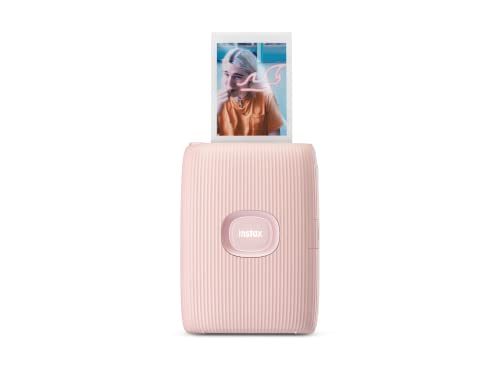
Fujifilm Instax Mini Link 2
★★★★★ 4.7 / 5 Best for Instant Film Look
The Fujifilm Instax Mini Link 2 uses Instax Mini film for classic instant photos. It offers a retro aesthetic and a unique app with augmented reality features. Owners love the tangible film quality and the ability to print from your phone.
Print Technology Instax FilmPrint Resolution 800 x 600 dpi (approx)Connectivity BluetoothPaper Size 2.1 x 3.4 inches
- Authentic film look
- Large battery capacity
- AR features in app
- Film is more expensive per print
- Prints are not waterproof
Best for: Best for Instant Film Look
Kodak Mini 3
★★★★★ 4.5 / 5 Best for Photo Booth
The Kodak Mini 3 uses dye-sublimation to print 2.1 x 3.4 inch photos with a protective coating. It offers a photo booth mode that prints multiple copies at once. Owners appreciate the durability and color accuracy.
Print Technology Dye-sublimationPrint Resolution 291 x 291 dpiConnectivity BluetoothPaper Size 2.1 x 3.4 inches
- Waterproof and smudge-proof prints
- Photo booth mode
- Consistent color output
- Requires ribbon and paper kit
- Slightly bulkier design
Best for: Best for Photo Booth
HP Sprocket Studio
★★★★★ 4.3 / 5 Best for Larger Prints
The HP Sprocket Studio prints true 4x6 inch photos using dye-sublimation. It connects via Wi-Fi and works with a dedicated app. Owners like the larger format for framing and gifting, though it is not pocket-sized.
Print Technology Dye-sublimationPrint Resolution 300 x 300 dpiConnectivity Wi-Fi, BluetoothPaper Size 4 x 6 inches
- Standard photo size
- High-quality prints
- Wireless connectivity
- Not portable
- Higher cost per print
Best for: Best for Larger Prints
We compared specs like resolution, connectivity, and paper costs, plus owner feedback on durability and ease of use. This guide covers the best options for different needs and budgets.
How to Choose a Mini Photo Printer
Start with print technology. ZINK printers use embedded color crystals, so no ink cartridges are needed. Dye-sublimation printers use ribbons and produce more durable prints. Consider the print size you want, from 2x3 inches to 4x6 inches. Check connectivity options like Bluetooth or Wi-Fi, and battery life for portability. Finally, factor in the ongoing cost of paper and ink.
Print Quality and Resolution
Resolution is measured in dots per inch (dpi). Higher dpi usually means sharper details. ZINK printers typically offer around 314 dpi, which is fine for small prints. Dye-sublimation printers can achieve similar or higher resolution with better color depth. Look for prints with a protective coating to resist fading and water damage.
Connectivity and App Features
Most mini printers connect via Bluetooth to a smartphone app. Apps let you edit, add filters, and print from social media. Some offer augmented reality or templates. Check if the app is compatible with your phone's operating system. Wi-Fi connectivity is useful for faster transfer of larger files.
Paper and Ink Costs
ZINK paper packs cost more per print than traditional photo paper. Dye-sublimation requires ribbon and paper kits, which can be pricey. Compare the cost per print across models. For frequent printing, a printer with lower ongoing costs may save money in the long run.
Questions people ask
What is the best mini photo printer for iPhone?
The Canon Zoemini 2 works seamlessly with iOS via Bluetooth and the Canon Mini Print app. It offers good print quality and easy sharing.
How do ZINK printers work?
ZINK paper has embedded color crystals that are activated by heat. The printer applies precise heat to produce the image, eliminating the need for ink cartridges.
Can mini photo printers print from Android phones?
Yes, most mini printers support Android via Bluetooth. Check the app compatibility on the Google Play Store before buying.
What is the difference between ZINK and dye-sublimation?
ZINK uses special paper with color crystals, while dye-sublimation uses a ribbon that transfers dye onto paper. Dye-sublimation prints are typically more durable and water-resistant.
Are mini photo printers worth it?
If you enjoy instant physical photos for scrapbooking, gifts, or decorating, a mini printer is worth it. Consider the cost per print and your usage frequency.
How long do mini photo prints last?
ZINK prints can last years if kept away from direct sunlight and moisture. Dye-sublimation prints are more resistant to fading and water, lasting longer.
Can I print from a computer?
Some mini printers support USB or Wi-Fi printing from a computer, but most are designed for mobile use. Check the specifications for desktop compatibility.
What is the best mini photo printer for travel?
The Canon Ivy 2 is compact and lightweight, making it easy to pack. Its Bluetooth connectivity and long battery life are ideal for on-the-go printing.
Which mini photo printer has the best print quality?
Dye-sublimation printers like the Kodak Mini 3 offer superior color accuracy and durability. For ZINK, the HP Sprocket Plus is often praised for vibrant colors.
Is the HP Sprocket Studio worth it?
If you need 4x6 inch prints for framing, the HP Sprocket Studio is a solid choice. It offers high quality but is not portable and has higher per-print costs.
The bottom lineSo which one?
For most people, the Canon Zoemini 2 offers the best balance of quality, portability, and ease of use. If you want a retro film look, the Fujifilm Instax Mini Link 2 is a fun alternative. Budget buyers can rely on the Kodak Step for basic prints.