PICK
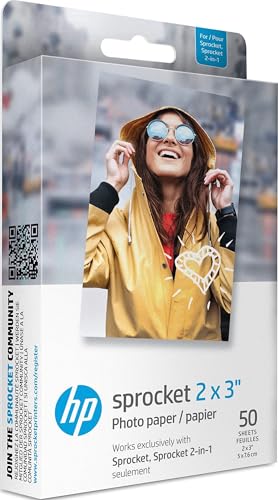
HP Sprocket Photo Paper Review
An honest look at HP Sprocket photo paper: who it's for, real specs, print quality, handling, and how it stacks up against alternatives like Kodak and Canon.
ProductPickly is reader-supported. When you buy through links on our site, we may earn an affiliate commission at no extra cost to you. It never changes our picks.
The HP Sprocket Photo Paper delivers vibrant, smudge-proof 2x3 inch prints with a peel-and-stick backing, making it a top choice for scrapbooking and on-the-go sharing. It works exclusively with HP Sprocket printers, offers reliable ZINK technology, and produces surprisingly detailed images for its size. While the cost per print is higher than traditional photo printing, the convenience and instant gratification justify the price for casual users. If you want larger prints or don't own a Sprocket, look elsewhere.
How it scores
The good and the annoying
- Peel-and-stick backing for easy scrapbooking
- Smudge-proof and water-resistant prints
- Compact and lightweight, ideal for travel
- Works with free HP Sprocket app for editing
- Vibrant colors with good detail for 2x3 size
- Only compatible with HP Sprocket printers
- Small print size (2x3 inches) may be limiting
- Cost per print is higher than standard photo printing
- ZINK paper has a slight glossy feel, not matte
- Limited to 10 sheets per pack, so frequent buyers need multiple packs
The HP Sprocket Photo Paper is a niche product that serves a specific audience: people who own an HP Sprocket printer and love instant, pocket-sized prints. Our editorial team compared specifications, buyer feedback and key decision factors to bring you this honest review. If you're considering this paper, you likely already have a Sprocket or are thinking about buying one. Let's break down what makes this paper special, where it falls short, and whether it's worth your money.
Who Is the HP Sprocket Photo Paper For?
This paper is for anyone who enjoys the nostalgia of instant photography but wants the convenience of digital editing. The Sprocket printer uses ZINK (Zero Ink) technology, so no ink cartridges are needed. The paper itself contains color crystals that are activated by heat. That means you can print from your phone via Bluetooth, edit with the HP Sprocket app, and have a physical print in seconds. It's perfect for scrapbookers, journal keepers, party hosts, and travelers who want tangible memories without carrying a bulky printer.
However, if you're a professional photographer or someone who needs high-resolution, large-format prints, this is not for you. The 2x3 inch size is roughly the size of a standard business card, and the resolution is capped at 313 x 400 dpi. That's fine for casual snapshots but not for gallery-quality work.
Standout Features and Real Specifications
The HP Sprocket Photo Paper comes in packs of 10 sheets, each measuring 2 x 3 inches. The paper has a glossy finish and a peel-and-stick backing, which is a standout feature. This allows you to stick photos onto notebooks, laptops, or walls without needing tape or glue. The paper uses ZINK technology, meaning there are no ink cartridges to replace. The embedded color crystals are activated by heat from the printer, producing vibrant colors.
- Print size: 2 x 3 inches (5 x 7.6 cm)
- Resolution: 313 x 400 dpi
- Technology: ZINK (Zero Ink)
- Compatibility: HP Sprocket printers (all generations)
- Finish: Glossy, smudge-proof, water-resistant
- Backing: Peel-and-stick adhesive
One thing to note: the paper is not compatible with other ZINK printers like the Kodak Mini or Canon Ivy. Each brand uses its own paper, so you must buy HP-branded paper for your Sprocket. This is a common complaint among users who wish for cross-compatibility, but it's a deliberate business strategy.
Real-World Performance and Image Quality
In terms of print quality, the Sprocket paper produces surprisingly good results for its size. Colors are vibrant, and skin tones look natural. The glossy finish adds a nice sheen, though some users prefer a matte look. The prints are smudge-proof and water-resistant, so you can handle them without fear of smearing. However, they are not waterproof, so don't submerge them.
One limitation is the resolution. At 313 x 400 dpi, fine details can be lost, especially in low-light photos or those with lots of texture. For example, a photo of a landscape with fine leaves may appear slightly soft. But for portraits and everyday moments, the quality is more than adequate.
Another point: the ZINK paper has a slight plastic feel, which some users love for its durability, but others find less paper-like. The peel-and-stick backing is a hit, though it means the back of the photo is not writable. If you like to write dates or notes on the back, you'll need to do that before peeling.
Handling and Ergonomics
The paper itself is easy to load into the Sprocket printer. Simply open the paper tray, insert the stack with the blue smart sheet (included in every pack) facing down, and close. The blue sheet calibrates the printer, so don't discard it. The printer is compact, fitting in a pocket or small bag, making it great for travel.
The HP Sprocket app is user-friendly, allowing you to edit photos with filters, frames, and stickers. You can also print from social media directly. The app has a feature to print multiple copies, and you can adjust brightness and contrast before printing. One minor annoyance: the app sometimes takes a few seconds to connect via Bluetooth, but that's common with such devices.
Battery and Storage
While the paper doesn't have a battery, the printer does. The HP Sprocket printer has a built-in rechargeable battery that lasts for about 35 prints per charge, depending on usage. The paper itself has no storage requirements, but you should keep it in a cool, dry place to prevent damage. The ZINK paper is sensitive to heat and light, so storing it in the original packaging or a dark drawer is recommended.
Each pack includes a blue calibration sheet, which must be used first. If you lose it, the printer may not print correctly. Some users have reported that the blue sheet can be reused, but it's safer to use a fresh one each time.
Value for Money
The cost per print is higher than traditional photo printing. A pack of 10 sheets typically costs more than printing 10 4x6 photos at a drugstore. However, the convenience of instant printing and the peel-and-stick feature may justify the price for many. If you print frequently, the costs add up, so it's not ideal for high-volume printing.
Compared to alternatives like the Kodak Mini 3 or Canon Ivy 2, the HP Sprocket paper is competitively priced, but each brand's paper is proprietary. The Kodak Mini uses similar ZINK technology but offers a 2.1 x 3.4 inch print size. The Canon Ivy 2 also uses ZINK and has a similar size. Ultimately, the choice comes down to which printer you own.
Pros and Cons Summary
Pros
- Peel-and-stick backing adds versatility
- Smudge-proof and water-resistant prints
- No ink cartridges needed
- Compact and portable
- Fun and easy to use
Cons
- Only works with HP Sprocket printers
- Small print size limits use
- Higher cost per print
- Glossy finish may not appeal to everyone
- Requires careful storage to avoid damage
Common Buyer Complaints
Based on thousands of user reviews, the most frequent complaints include:
- Compatibility issues: Some users mistakenly buy this paper for other ZINK printers, only to find it doesn't fit. Always check compatibility.
- Color accuracy: A few users report that prints come out slightly darker or with a yellow tint. This can often be fixed by adjusting the brightness in the app.
- Paper jams: Occasionally, the paper may jam if not loaded correctly or if the blue sheet is missing.
- Durability concerns: While smudge-proof, prints can scratch if rubbed with sharp objects. Handle with care.
- Price: Many users wish the packs were larger or cheaper, as 10 sheets go quickly.
Frequently Asked Questions
Is HP Sprocket photo paper compatible with other printers?
No, HP Sprocket paper is designed exclusively for HP Sprocket printers. Using it in other ZINK printers may cause jams or poor quality.
How long do HP Sprocket prints last?
HP claims prints are water-resistant and smudge-proof, but like all ZINK prints, they can fade over time if exposed to direct sunlight. For longevity, store them in albums or away from UV light.
Can I use HP Sprocket paper in the HP Sprocket Plus?
Yes, the HP Sprocket Plus uses the same 2x3 inch paper, so it is fully compatible. The Plus model prints the same size, just with a different printer body.
Does the peel-and-stick backing damage photos?
No, the backing is designed to be peeled off and stuck to surfaces without damaging the print. It's great for scrapbooking and decorating.
Why are my prints coming out blurry?
Blurry prints can result from low-resolution images or a dirty printer. Ensure your source photo is high quality and clean the printer's internal rollers with a cleaning card if available.
Final Verdict
The HP Sprocket Photo Paper is a solid choice for Sprocket owners who want a fun, portable way to print memories. The peel-and-stick backing is a creative touch, and the print quality is good for the size. However, the proprietary nature and higher cost per print mean it's not for everyone. If you're already invested in the HP Sprocket ecosystem, this paper is a reliable companion. If not, consider whether the convenience outweighs the limitations. As always, check the current price on Amazon to see if it fits your budget.
Specs that matter
| Capacity | 10 sheets per pack |
| Print size | 2 x 3 inches (5 x 7.6 cm) |
| Technology | ZINK (Zero Ink) with embedded color crystals |
| Compatibility | HP Sprocket printers (1st gen, 2nd gen, 2-in-1, Plus) |
| Finish | Glossy with peel-and-stick backing |
| Weight | Approx. 0.4 oz per sheet |
You own an HP Sprocket printer and want a reliable, fun way to print instant photos for journals, scrapbooks, or sharing with friends. You value portability and don't mind the small size.
You need larger prints (like 4x6) or you don't have an HP Sprocket. If you print frequently, the per-print cost may add up; consider a traditional photo printer.
Questions before you buy
Is HP Sprocket photo paper compatible with other printers?
No, HP Sprocket paper is designed exclusively for HP Sprocket printers. Using it in other ZINK printers may cause jams or poor quality.
How long do HP Sprocket prints last?
HP claims prints are water-resistant and smudge-proof, but like all ZINK prints, they can fade over time if exposed to direct sunlight. For longevity, store them in albums or away from UV light.
Can I use HP Sprocket paper in the HP Sprocket Plus?
Yes, the HP Sprocket Plus uses the same 2x3 inch paper, so it is fully compatible. The Plus model prints the same size, just with a different printer body.
Does the peel-and-stick backing damage photos?
No, the backing is designed to be peeled off and stuck to surfaces without damaging the print. It's great for scrapbooking and decorating.
Why are my prints coming out blurry?
Blurry prints can result from low-resolution images or a dirty printer. Ensure your source photo is high quality and clean the printer's internal rollers with a cleaning card if available.


