Printers and Photo Printing
Photo Printers: Top Picks for Every Need
7 picks compared
6 min read
ProductPickly is reader-supported. When you buy through links on our site, we may earn an affiliate commission at no extra cost to you. It never changes our picks.
The short answerFor the best overall, the Canon Selphy CP1500 delivers lab-quality prints. The Epson Expression Photo XP-15000 suits wide-format needs. The HP Sprocket Studio excels at instant 4x6 prints.
?How we pickedWe compare published specifications, safety certifications and thousands of verified owner reviews, and we do not physically test every unit. Read the full process in our review methodology.
Canon Selphy CP1500
★★★★★ 4.8 / 5 Best Overall
The Canon Selphy CP1500 produces borderless 4x6 prints with a protective coating. It connects via Wi-Fi, USB, or memory card. Owners report rich colors and sharp details for the price.
Print Technology Dye-sublimationMax Print Size 4x6 inchesConnectivity Wi-Fi, USB, SD cardPrint Speed Approx. 41 sec per print
- Excellent color accuracy
- Compact and portable
- Low cost per print
- Limited to small sizes
- Requires proprietary paper and ink
Epson Expression Photo XP-15000
★★★★★ 4.6 / 5 Best for Wide Format
The Epson XP-15000 prints up to 13x19 inches with six-color Claria inks. It handles fine art and photo papers up to 1.3mm thick. Wi-Fi, Ethernet, and USB connectivity are built in.
Print Technology Inkjet (6-color)Max Print Size 13x19 inchesConnectivity Wi-Fi, Ethernet, USBPrint Speed 9 ppm color (draft)
- Large format capability
- Vivid color gamut
- Versatile paper handling
- Bulky footprint
- Ink replacement can be costly
Best for: Best for Wide Format
HP Sprocket Studio
★★★★★ 4.5 / 5 Best for Instant Prints
The HP Sprocket Studio prints 4x6 photos directly from your phone using Zink paper. No ink cartridges are needed, just special paper. It is ideal for parties and on-the-go sharing.
Print Technology Zink (zero ink)Max Print Size 4x6 inchesConnectivity Bluetooth, USB-CPrint Speed Approx. 60 sec per print
- No ink to replace
- Sticky-back prints for scrapbooks
- Compact and travel-friendly
- Prints are prone to scratches
- Limited to 4x6 size
Best for: Best for Instant Prints
Canon PIXMA TS9521C
★★★★★ 4.4 / 5 Best for Crafts and Scrapbooking
The Canon PIXMA TS9521C is an all-in-one that prints, scans, and copies. It supports borderless printing up to 8.5x11 and handles cardstock, labels, and iron-on transfers. Its five individual ink tanks keep costs down.
Print Technology Inkjet (5-color)Max Print Size 8.5x11 inches (borderless)Connectivity Wi-Fi, USB, SD cardPrint Speed 10 ppm black, 6.7 ppm color
- Versatile media handling
- Individual ink tanks
- Built-in scanner and copier
- Slower photo prints
- Larger footprint
Best for: Best for Crafts and Scrapbooking
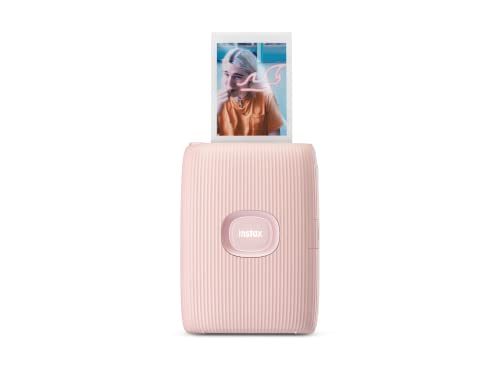
Fujifilm Instax Mini Link 2
★★★★★ 4.6 / 5 Best for Smartphone Integration
The Fujifilm Instax Mini Link 2 prints credit-card-sized photos via Bluetooth. Its app offers templates, filters, and augmented reality features. Each print is a classic Instax instant photo.
Print Technology Instax filmMax Print Size 2.4 x 3.5 inchesConnectivity BluetoothPrint Speed Approx. 15 sec per print
- Fun, retro aesthetic
- Rich app features
- No ink, just film
- Small print size
- Film cost per print is high
Best for: Best for Smartphone Integration
Epson EcoTank ET-8550
★★★★★ 4.7 / 5 Best for High Volume
The Epson EcoTank ET-8550 uses refillable ink tanks instead of cartridges. It prints borderless up to 13x19 inches and includes a scanner. Owners report thousands of prints before refilling.
Print Technology Inkjet (6-color, refillable)Max Print Size 13x19 inches (borderless)Connectivity Wi-Fi, Ethernet, USBPrint Speed 16 ppm black, 12 ppm color
- Very low cost per print
- High page yield
- Large format printing
- High upfront price
- Heavy and bulky
Best for: Best for High Volume
Kodak Step Instant Printer
★★★★★ 4.3 / 5 Best Budget Pick
The Kodak Step Instant Printer is a pocket-sized device that prints 2x3 sticky photos. It uses Zink paper and connects via Bluetooth. It is the most affordable way to print on the go.
Print Technology Zink (zero ink)Max Print Size 2x3 inchesConnectivity BluetoothPrint Speed Approx. 60 sec per print
- Very low price
- Ultra-portable
- Sticky-back prints
- Tiny prints
- Limited color range
Best for: Best Budget Pick
We compared specifications, owner feedback, and real-world use cases. Our picks balance quality, speed, and running costs.
What to Look For in a Photo Printer
Start with the print technology. Dye-sublimation printers offer glossy, water-resistant prints. Inkjet printers provide more size and paper options. Consider the maximum print size you need. Most home users stick with 4x6 or 8.5x11. Check connectivity options like Wi-Fi, Bluetooth, or memory card slots. Finally, estimate your monthly print volume to gauge running costs.
Print Quality and Resolution
Resolution is measured in dots per inch (dpi). Higher dpi usually means finer detail. For photo printing, look for at least 4800 x 1200 dpi. However, print technology matters more than raw numbers. Dye-sublimation prints have a continuous tone, while inkjet uses tiny dots. Owners often report that dye-sub photos look more like traditional prints. Inkjet prints can show grain in solid areas if the resolution is low.
Cost Per Print and Media
The initial price is only part of the picture. Ink and paper are ongoing expenses. Dye-sublimation printers use proprietary cartridges and paper. Zink printers require special paper but no ink. Inkjet printers with individual tanks, like EcoTank, offer the lowest cost per print. Compare the price of a 100-sheet pack of paper. A printer with cheap consumables can save you money over time.
Connectivity and Mobile Printing
Most modern photo printers support Wi-Fi and Bluetooth. This lets you print directly from your phone or tablet. Some have companion apps with editing tools and templates. AirPrint and Google Cloud Print are common features. If you shoot with a camera, look for memory card slots or USB ports. For travel, a portable Bluetooth printer is convenient. For home use, Wi-Fi is essential for multi-device sharing.
Questions people ask
What is the best photo printer for home use?
The Canon Selphy CP1500 is a top choice for home snapshots. It produces lab-quality 4x6 prints with a protective coating. If you need larger prints, consider the Epson XP-15000.
Which photo printer has the lowest running cost?
The Epson EcoTank ET-8550 uses refillable ink tanks. Owners report thousands of prints before refilling. Its cost per print is significantly lower than cartridge-based printers.
Can I print photos without a computer?
Yes, many models have Wi-Fi or Bluetooth for direct phone printing. The HP Sprocket Studio and Kodak Step rely on mobile apps. Some also accept memory cards or USB drives.
Is a dye-sublimation printer better than inkjet?
Dye-sublimation prints are more durable and water-resistant. They also have a continuous tone, which looks more like traditional photos. Inkjet offers larger sizes and lower cost per print if you use refillable tanks.
How do I choose between a compact and a full-size photo printer?
Compact printers are portable and easy to store. They usually print only 4x6 or smaller. Full-size printers offer larger prints, scanning, and more paper options. Consider your available space and output needs.
What is Zink paper and how does it work?
Zink stands for zero ink. The paper contains dye crystals that are activated by heat. The printer applies heat to create the image. No ink cartridges are needed, just the special paper.
Can I print borderless photos?
Many photo printers support borderless printing. Check the specs for 'borderless' on your desired size. The Canon Selphy CP1500 and Epson XP-15000 both do borderless 4x6 and larger.
Which photo printer is best for scrapbooking?
The Canon PIXMA TS9521C handles cardstock, labels, and iron-on transfers. Its five-color ink system produces vibrant colors. You can also print stickers with Zink printers like the HP Sprocket Studio.
Are instant printers worth it?
Instant printers are fun and convenient for social prints. They are not ideal for archival quality. If you want durable, long-lasting photos, a dye-sub or inkjet is better.
How long do photo prints last?
Dye-sublimation prints are rated for 100 years or more under glass. Inkjet prints can last decades with pigment inks. Zink prints are less archival and may fade over time. Store prints away from direct sunlight.
The bottom lineSo which one?
The best photo printer depends on your output size and budget. For most people, the Canon Selphy CP1500 offers the best balance of quality and convenience. If you print large or high volume, the Epson EcoTank ET-8550 is a smart investment.