Cabinet Pull Templates
Best Cabinet Pull Templates for Straight, Repeatable Handle Holes
8 picks compared
8 min read
ProductPickly is reader-supported. When you buy through links on our site, we may earn an affiliate commission at no extra cost to you. It never changes our picks.
The short answerFor most kitchens the best cabinet pull template is an adjustable, self-centering jig like the WORKPRO, because one tool dials in almost any center-to-center spacing for pulls and drops down to a single centered hole for knobs, so you drill every door and drawer to the same layout without measuring twice. If your handles are wide and your hole spacing is large, a big installation template kit such as the Ravinte covers the long center-to-center ranges that a compact jig runs out of room for. The two things that decide the right template for you are adjustment range, since a jig that only reaches common pull spacings will not fit an oversized appliance pull, and reference edges, because a jig that registers off the door edge or corner is what makes the holes line up from cabinet to cabinet instead of drifting. Below are our picks across adjustable jigs, fixed templates and template-and-punch combos, so you can match one to your hardware and the number of doors ahead of you.
?How we pickedWe compare published specifications, safety certifications and thousands of verified owner reviews, and we do not physically test every unit. Read the full process in our review methodology.
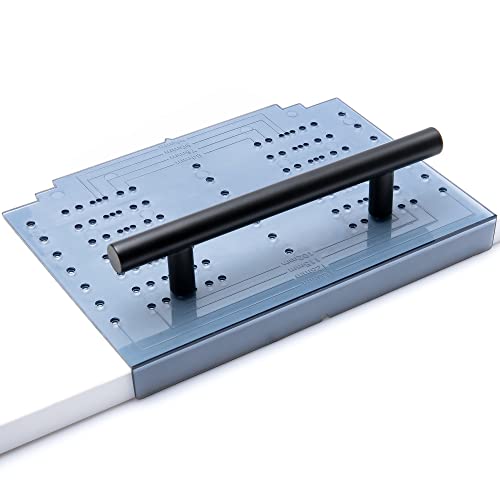
WORKPRO Cabinet Hardware Jig, Adjustable Cabinet Handle Template
★★★★★ 4.6 / 5 Best overall
The WORKPRO is the jig most people should reach for first, an adjustable tool that slides to set the center-to-center spacing for a pull and then handles a single centered hole for a knob, so one purchase covers every kind of hardware in a kitchen. Because it registers off the edge of the door or drawer face and centers the holes for you, the layout repeats from one cabinet to the next instead of drifting a little each time you measure by hand.
Type Adjustable jigSpacing Slides to set center-to-centerCentering Self-centering guidesHandles Knobs and pulls
- One tool sets any common pull spacing and knobs
- Registers off the door edge for repeatable holes
- Adjusts without measuring each cabinet by hand
- Adjustment range runs out on oversized pulls
- More setup than a single fixed template
Best for: anyone doing a whole kitchen with one adjustable tool
Saker Cabinet Hardware Doweling Jig, Adjustable Self-Centering Template
★★★★★ 4.5 / 5 Best self-centering jig
The Saker doweling jig borrows the self-centering idea from woodworking dowel jigs, clamping onto the face and centering the drill guides so both holes of a pull land evenly on either side of the middle. It is the pick when you want the holes truly centered without eyeballing, and the adjustable guide lets you match different center-to-center spacings as you move between drawer fronts and doors.
Type Adjustable doweling jigCentering Self-centering drill guidesSpacing Adjustable center-to-centerUse Knobs and pulls
- Self-centering guides keep both holes even
- Adjusts across common pull spacings
- Doweling-style body feels solid in use
- Takes a moment to set the spacing each size
- Compact frame limits very wide pulls
Best for: people who want holes truly centered without eyeballing
Ravinte Cabinet Door Drawer Hardware Installation Template Kit, Big
★★★★★ 4.4 / 5 Best for wide pulls
The Ravinte is a larger installation template built for the cabinets a compact jig struggles with, giving you the reach to lay out wide pulls and long center-to-center spacing on big drawer fronts and appliance-style handles. It carries separate references for doors and drawers, so you set the position once for a run of doors and again for the drawers rather than reworking the layout on every piece.
Type Large template kitRange Suits wide pulls, long spacingReferences Door and drawer positionsUse Knobs and pulls
- Handles wide pulls and long center-to-center spacing
- Separate door and drawer references
- Big footprint steadies layout on large fronts
- Larger than needed for small knobs only
- Fixed layout is less flexible than an adjustable jig
Best for: kitchens with wide pulls and long hole spacing
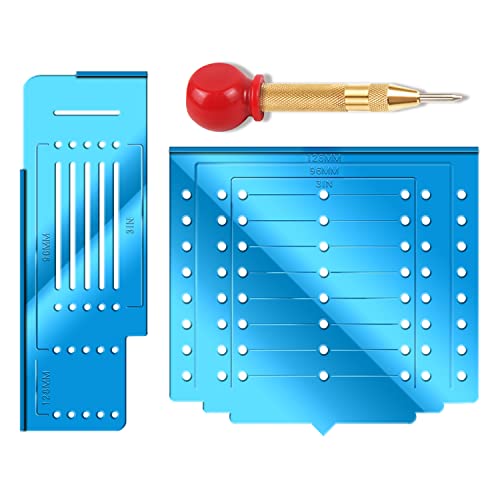
King&Charles Cabinet Hardware Template and Center Punch for Handles Knobs Pulls
★★★★★ 4.3 / 5 Best template and punch
This King&Charles pairs a fixed template with a center punch, which is a practical combination because the template positions the hole and the punch dimples the exact spot so your drill bit does not wander when it starts. It keeps the process simple, mark then drill, and having the punch in the same package means you are not hunting for a separate tool when it is time to start the hole cleanly.
Type Fixed template plus punchMarking Center punch includedCovers Handles, knobs, pullsUse Mark then drill
- Punch dimples the spot so the bit starts clean
- Template and marking tool arrive together
- Simple mark-then-drill workflow
- Fixed template is less flexible than a jig
- Extra step to punch before drilling
Best for: people who want a template with a punch in one buy
Saker Cabinet Hardware Jig, Cabinet Handle Doweling Template Tool
★★★★★ 4.3 / 5 Best compact jig
The smaller Saker jig is the everyday option for a straightforward run of handles, a compact doweling-style template that sets the spacing and guides the bit without the bulk of a large kit. It suits common cabinet hardware rather than oversized pulls, and its size makes it easy to reposition quickly as you work down a row of matching doors and drawers.
Type Compact doweling jigSpacing Adjustable for common sizesGuides Drill guide holesUse Knobs and pulls
- Compact body is quick to reposition
- Handles the common cabinet hardware sizes
- Doweling-style guide keeps the bit straight
- Not built for very wide pulls
- Fewer layout options than a multi template
Best for: a straightforward run of standard-size handles
King&Charles Multi Cabinet Hardware Template and Center Punch for Handle Knob Pull
★★★★★ 4.2 / 5 Best for varied layouts
The multi version from King&Charles offers several hole layouts on one template, which helps when a kitchen mixes knob positions and a few different pull spacings and you would rather not switch tools. The included center punch marks the spot so the drill starts where you want it, and having a spread of layouts on hand covers the odd cabinet that does not match the rest.
Type Multi-layout templateLayouts Several hole positionsMarking Center punch includedCovers Handle, knob, pull
- Several layouts on one template
- Center punch marks the spot cleanly
- Handles mixed knob and pull positions
- Fixed positions rather than free adjustment
- Reading the right layout takes a moment
Best for: kitchens that mix knob and pull layouts
King&Charles Cabinet Hardware Jig and Automatic Center Punch Set
★★★★★ 4.2 / 5 Best jig with auto punch
This King&Charles set pairs an adjustable jig with an automatic center punch, the spring-loaded kind that dimples the surface with a press instead of a hammer tap. It is a tidy combination for cabinet work, since the jig positions the holes and the automatic punch starts them without a second tool or a mallet, which keeps the job quiet and one-handed when a door is awkward to hold.
Type Adjustable jig plus punchPunch Automatic spring-loadedSpacing Adjustable center-to-centerUse Knobs and pulls
- Automatic punch starts holes without a mallet
- Jig and punch arrive as a set
- One-handed marking on awkward doors
- Automatic punch adds bulk to the kit
- Adjustment range suits common sizes best
Best for: people who want a jig and a no-hammer punch together
Drill Mounting Template for Kitchen Cabinet Pulls and Knobs, 1 Pack
★★★★★ 4.1 / 5 Best simple template
This single drill template is the plain, no-frills choice for someone installing a small number of pulls and knobs who does not need an adjustable jig. It guides the bit to a set hole position, which is enough for a few cabinets, and its low complexity means there is nothing to set up before you start. For a full kitchen an adjustable jig saves more time, but for a handful of handles a fixed template does the job.
Type Fixed drill templatePack Single templateCovers Pulls and knobsSetup None, ready to use
- Nothing to set up before drilling
- Low cost way to guide a few holes
- Simple enough for a first-time install
- Fixed position does not adjust to spacing
- Slow across a whole kitchen of cabinets
Best for: installing a small number of pulls and knobs
A cabinet pull template solves one fiddly problem in a simple way: it puts the screw holes for a handle or knob in the right place so you do not have to measure, mark and hope on every door and drawer. The catch is that these tools differ in ways you notice the moment you start, mainly whether they adjust or sit at fixed positions, how they handle a two-hole pull versus a single-hole knob, how they reference the edge of a door against the center of a drawer, and how solidly they repeat the same layout across a whole kitchen. This guide sorts our picks by those real differences so you can match one to your hardware and the number of cabinets ahead of you rather than to a single headline word.
Adjustable jig versus a fixed template
The biggest split in these tools is whether the hole positions move. An adjustable jig, like the WORKPRO, slides to set the center-to-center spacing for a pull and closes down to a single centered hole for a knob, so one tool covers every kind of hardware in a kitchen. A fixed template has set positions and no adjustment, which is faster to grab but only works for the sizes it was built for. If you are fitting many cabinets or mixing knob and pull sizes, the adjustable jig earns its place, because you set the spacing once and reuse it. For a handful of handles at one spacing, a plain template is enough and there is nothing to set up.
Knobs, pulls and center-to-center spacing
Hardware falls into two shapes, and a template has to handle both. A knob is a single screw hole, so the tool only needs to center one hole on a stile or drawer front. A pull uses two holes set at a center-to-center distance, and that distance is the number that decides whether the handle fits what you drilled. Pulls come in a range of spacings, so measure your hardware before you buy, because a template that cannot reach your pull spacing will not line up. A self-centering jig helps here, since it splits the distance for you and keeps both holes even around the middle rather than leaving you to eyeball it.
Doors and drawers use different reference edges
Where the handle sits changes with the cabinet. On a door, hardware usually goes near a bottom or top corner, so the template registers off the door edge and corner to keep it a consistent distance in from the sides. On a drawer front, the handle is normally centered, so the template references the middle of the face instead. Good jigs give you both, which is why a larger kit with separate door and drawer settings, like the Ravinte, saves you from reworking the layout every time you switch. Pick a template that clearly supports both placements if your kitchen mixes knobs on the doors with pulls on the drawers.
Build quality and repeatable accuracy
The whole value of a template is that it repeats, so the details that protect accuracy matter. A solid body that does not flex keeps the drill guides square, and a center punch, manual or the automatic kind in the King&Charles set, dimples the spot so the bit bites instead of skating across a finished face. Set the tool once, register off the same edge on every door, keep the drawer holes centered, and drill with a sharp bit and a depth stop where the jig allows so you do not punch through. Trust the template rather than re-measuring each cabinet, and the handles line up cleanly across the whole run.
Questions people ask
What is a cabinet pull template?
A cabinet pull template is a guide that positions the screw holes for a handle or knob so you drill them in the right place without measuring each one by hand. Some are fixed templates with set hole positions, and some are adjustable jigs that slide to match different center-to-center spacings. The point of any of them is repeatability. Once you set the position, every door and drawer gets the same layout, so the handles line up across the kitchen instead of sitting a little high or low from one cabinet to the next.
What does center-to-center spacing mean for pulls?
Center-to-center is the distance between the middles of the two screw holes on a pull, and it is the number that decides whether a handle fits the holes you drill. Pulls come in a range of spacings, and a knob is effectively a single hole with no spacing at all. An adjustable jig like the WORKPRO lets you set that distance directly, while a fixed template is built for set positions. Measure your hardware first, because a template that does not reach your pull's spacing will not line up the holes correctly.
Do I need an adjustable jig or a fixed template?
It depends on how many cabinets you are doing and how varied the hardware is. If you are fitting a whole kitchen or mixing knobs and different pull sizes, an adjustable jig pays off because one tool sets every spacing and repeats it cabinet to cabinet. If you only have a few handles at one spacing, a fixed template like the single drill template is simpler and there is nothing to set up. Match the tool to the size of the job rather than buying more adjustment than you need.
How do templates handle knobs versus pulls?
A knob uses one screw hole, so a template just needs to center a single hole on the door stile or drawer front. A pull uses two holes set at a center-to-center spacing, so the template has to position both evenly around the middle. Many jigs do both, dropping to a single centered hole for knobs and opening up for the two-hole pull layout. Check that the template covers both if your kitchen mixes knobs on the doors and pulls on the drawers, which is a common combination.
How do doors and drawers use different reference edges?
On a door, hardware is usually placed near a bottom or top corner of the stile, so the template registers off the door edge and corner to keep the handle a consistent distance in from the sides. On a drawer front, the hardware is normally centered, so the template references the middle of the face instead. Good jigs give you both references, which is why a kit with separate door and drawer settings, like the Ravinte, saves you from reworking the layout every time you switch between the two.
Why does a center punch help before drilling?
A center punch dimples the exact spot where the hole goes, and that small dent gives the drill bit something to bite so it does not skate across the surface when it starts. On a finished cabinet face that wandering can leave a scratch you cannot hide, so the punch protects the look as much as the accuracy. That is why several picks here, like the King&Charles template with a punch, bundle one in. An automatic punch does the same job with a press instead of a hammer tap.
Will these templates work on both doors and drawer fronts?
Most do, but they set up differently for each. A door usually gets the handle offset toward a corner, while a drawer front gets it centered, so you use the door reference for one and the drawer reference for the other. Adjustable jigs and larger template kits are built with this in mind and switch between the two positions. A very basic single template may favor one placement, so if you have a mix of doors and drawers, choose a template that clearly supports both layouts.
How do I keep the holes accurate across a whole kitchen?
Set the template once, then use the same reference every time. Register off the same edge or corner on each door, keep the drawer holes centered, and do not change the spacing between matching cabinets. A self-centering jig helps because it removes the guesswork of splitting the distance by eye. Drill with a sharp bit and, where the tool allows, a depth stop so you do not go through the face. The repeatability of the template is what keeps the handles aligned, so trust the tool rather than re-measuring each cabinet.
The bottom lineSo which one?
For most kitchens the best starting point is an adjustable, self-centering jig like the WORKPRO, because one tool sets any common pull spacing, drops to a single centered hole for knobs, and repeats the layout from cabinet to cabinet. If your pulls are wide or your spacing is long, the Ravinte template kit gives you the reach a compact jig runs out of, while the Saker doweling jig is the pick when you want the holes truly centered without eyeballing. The King&Charles template with a punch and the multi-layout version suit people who want a simple template with marking built in, the compact Saker jig covers a straightforward run of standard handles, the King&Charles jig and automatic punch set pairs positioning with no-hammer marking, and the single drill template is the plain choice for just a few handles. Match the adjustment range to your hardware and the reference edges to your mix of doors and drawers, and any of these will keep your holes straight and repeatable.