Wireless Keyboards
Best Wireless Keyboards for a Clutter-Free, Reliable Desk
7 picks compared
9 min read
ProductPickly is reader-supported. When you buy through links on our site, we may earn an affiliate commission at no extra cost to you. It never changes our picks.
The short answerFor most people the Logitech MK270 Wireless Keyboard and Mouse Combo is the standout pick, pairing a stable 2.4GHz link through a single receiver with a familiar full-size layout and battery life measured in years. If you want to spend less, the Logitech MK235 covers the basics with a spill-resistant build, while the Logitech Ergo K860 is the ergonomic choice with its split curved layout and multi-device pairing. The Logitech MK335 is the quiet-typing pick, the MK345 adds a more comfortable contoured mouse and palm rest, the EDJO combo is a budget silent option, and the MEETION set brings a styled finish with a wrist rest. Choose by how the keyboard connects, how the keys feel, its size, and its battery life rather than by the flashiest feature on the box.
?How we pickedWe compare published specifications, safety certifications and thousands of verified owner reviews, and we do not physically test every unit. Read the full process in our review methodology.
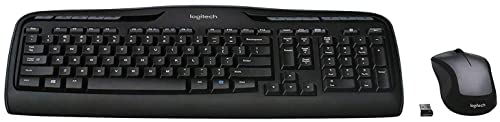
Logitech MK270 Wireless Keyboard and Mouse Combo
★★★★★ 4.6 / 5 Best overall
The MK270 is the combo we point most people to first, because it nails the fundamentals a wireless keyboard needs: a stable 2.4GHz link through one tiny receiver, a familiar full-size layout, and battery life measured in years rather than weeks. It is a membrane board rather than a clicky mechanical one, so it stays quiet and plugs in with no software fuss, which is exactly what a desktop or family PC usually wants.
Connection 2.4GHz wireless via one USB receiverLayout Full-size with number pad and function keysSwitch type Quiet membrane keysBest for A reliable everyday desktop setup
- Rock-solid 2.4GHz link with a single receiver
- Long battery life on both keyboard and mouse
- Plug-and-go with no software to install
- No Bluetooth, so it needs a free USB port
- Membrane keys lack the feel of mechanical
Best for: anyone who wants a dependable, no-drama full-size combo
Logitech MK235 Wireless Keyboard and Mouse Combo
★★★★★ 4.6 / 5 Best value
The MK235 strips things back to what most people actually use, pairing a full-size keyboard and a basic mouse on the same reliable 2.4GHz receiver. Logitech quotes very long battery life and a spill-resistant, sturdy build, so it is the sensible choice for a second desk, an office rollout, or anyone who just wants a working combo without extras they will never touch.
Connection 2.4GHz wireless via one USB receiverLayout Full-size with number padDurability Spill-resistant, sturdy tilt legsBest for A no-frills value setup
- Very long rated battery life
- Spill-resistant, hard-wearing build
- Straightforward plug-in setup
- Plain design with no backlight
- Basic mouse with few extra buttons
Best for: shoppers who want a dependable combo for the least fuss
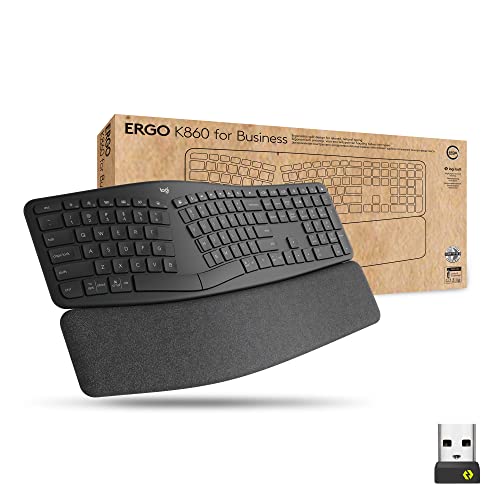
Logitech Ergo K860 Split Wireless Keyboard
★★★★★ 4.5 / 5 Best ergonomic
The Ergo K860 is the pick for anyone whose wrists ache after a long day, using a split curved layout and a cushioned pillowed wrist rest to keep hands in a more natural position. It connects over Bluetooth or the bundled receiver and can pair with more than one device, so it suits a work-from-home desk that juggles a laptop and a desktop, though the shaped layout takes a little time to adjust to.
Connection Bluetooth or bundled USB receiverLayout Split, curved, full-size with wrist restMulti-device Pairs and switches between devicesBest for Reducing wrist and forearm strain
- Split curved design eases wrist strain
- Bluetooth plus receiver with multi-device switching
- Cushioned wrist rest supports long sessions
- Split layout has a real learning curve
- Large footprint takes more desk space
Best for: typists who want an ergonomic keyboard for long days
Logitech MK335 Quiet Wireless Keyboard and Mouse
★★★★★ 4.5 / 5 Best quiet typing
The MK335 leans into quiet, comfortable typing, with low-noise membrane keys and an integrated palm rest that make it a good fit for shared rooms and open offices where a loud board would annoy everyone. It runs on the same reliable single-receiver wireless as the rest of the Logitech lineup, so you get the calm typing feel without giving up the plug-and-go simplicity.
Connection 2.4GHz wireless via one USB receiverLayout Full-size with integrated palm restSwitch type Low-noise membrane keysBest for Quiet typing in shared spaces
- Genuinely quiet membrane keys
- Built-in palm rest adds comfort
- Reliable single-receiver connection
- No backlight for dim rooms
- Palm rest makes the board longer front to back
Best for: people who type in shared rooms and want low noise
Logitech MK345 Wireless Keyboard and Mouse Combo
★★★★★ 4.6 / 5 Best for comfort
The MK345 pairs a comfortable full-size keyboard that has a palm rest with a contoured, right-handed mouse that fills the hand better than the flatter mice in cheaper combos. It keeps the dependable single-receiver wireless and long battery life Logitech is known for, making it a comfortable upgrade for a home desk where you spend real hours each day.
Connection 2.4GHz wireless via one USB receiverLayout Full-size with palm restMouse Contoured right-handed shapeBest for All-day comfort at a home desk
- Comfortable keyboard with palm rest
- Contoured mouse fills the hand well
- Long battery life and stable link
- Mouse shape suits right-handed users only
- No Bluetooth or backlight
Best for: home users who want a more comfortable everyday combo
EDJO Silent Full-Size Wireless Keyboard and Mouse
★★★★★ 4.4 / 5 Best budget silent
The EDJO combo is a budget-friendly option that focuses on quiet, lag-free typing over a 2.4GHz connection, with a slim full-size layout that still keeps the number pad. It is a straightforward pick for a laptop, Chromebook, or spare PC where you want cordless convenience and low key noise without paying for a name brand or software you will not use.
Connection 2.4GHz wireless via one USB receiverLayout Slim full-size with number padSwitch type Silent low-noise keysBest for A quiet, low-cost cordless setup
- Quiet keys keep noise down
- Slim full-size body saves space
- Simple plug-in use across PC and Chromebook
- Lesser-known brand than Logitech
- No Bluetooth or backlight
Best for: budget shoppers who want quiet cordless typing
MEETION Wireless Keyboard and Mouse with Wrist Rest
★★★★★ 4.4 / 5 Best styled pick
The MEETION combo adds a bit of personality with a colored finish and a full-size board that ships with an attached wrist rest for extra support. It runs on standard 2.4GHz wireless and covers the everyday basics, so it suits someone who wants their desk to look a little less generic while still getting a working keyboard and mouse in one box.
Connection 2.4GHz wireless via one USB receiverLayout Full-size with attached wrist restStyle Colored finish optionsBest for A styled desk that still covers the basics
- Wrist rest adds support out of the box
- Colored finish stands out on a desk
- Full-size layout keeps the number pad
- Lesser-known brand with less support
- No Bluetooth or multi-device pairing
Best for: shoppers who want a styled combo with a wrist rest
A good wireless keyboard clears the cable clutter from your desk while feeling just as instant and reliable as a wired one for everyday work. The picks below are all full-size combos that cover the essentials, and the guide underneath explains the four choices that actually decide which one fits your desk: how it connects, how the keys feel, how big it is, and how long it runs.
Bluetooth, 2.4GHz dongle, or multi-device
The first decision is how the keyboard talks to your computer. A 2.4GHz combo uses a small USB receiver that you plug in once and forget, giving a stable, low-lag link that works the moment you power on, which is why most of the picks here use it. The cost is one USB port, so it suits a desktop with ports to spare more than a slim laptop. Bluetooth skips the receiver and connects to the radio already built into a laptop, tablet, or phone, freeing that port but relying on the operating system to load first. Multi-device boards like the Ergo K860 offer the best of both, pairing over Bluetooth or a receiver and switching between machines with a button, so choose that route only if you genuinely bounce between two devices on the same desk.
Membrane versus mechanical keys
Every combo in this guide uses membrane switches, and for most people that is the right call rather than a compromise. Membrane keys are quiet, light, affordable, and often spill-resistant, which is exactly what a family PC or a shared office wants, and the quiet-focused picks here lean into that calm typing feel. Mechanical keyboards use individual switches that give a crisper, more tactile press and survive more keystrokes over their life, but they cost more, run louder, and are harder to find in a tidy wireless combo with a matching mouse. If you are a heavy typist who craves feedback and does not mind the noise, mechanical is worth seeking out, but for general typing, browsing, and office work a solid membrane board is quieter and easier to live with.
Full-size versus compact and tenkeyless
Layout is the choice you feel every day. A full-size keyboard keeps the number pad on the right, which is a real time-saver for spreadsheets, accounting, and any work with lots of digits, and that is why every pick in this guide is full-size. The trade-off is width, since the number pad pushes the mouse further from your typing hand. Compact and tenkeyless boards drop that pad to shrink the footprint, bringing the mouse closer and easing shoulder strain, which many people find more comfortable over long sessions. If you rarely type numbers in blocks, a smaller board can be the more ergonomic pick, but if the number pad earns its keep in your work, stay full-size and give the mouse a little more room instead.
Battery life and backlighting
One of the quiet joys of a membrane wireless combo is how rarely you think about power. The Logitech boards here are rated for very long life, often months for the mouse and up to a few years for the keyboard, because they draw little current and sleep when idle. Keeping a couple of spare batteries in a drawer means a dead board is a two-minute fix rather than a lost afternoon. Backlighting is the main thing that changes this math. Lit keys help in a dim room or an early start, but lighting is among the biggest power draws on a wireless board, so it trades runtime for visibility. If you work in decent light and want the longest possible battery life, a plain unlit combo like most of these picks is the smarter choice, and none of them need a backlight to do the job well.
Questions people ask
What is the difference between a Bluetooth and a 2.4GHz wireless keyboard?
A 2.4GHz keyboard talks to a small USB receiver you plug into a port, which gives a stable, low-lag link and works before the operating system even loads, but it uses up a USB slot. A Bluetooth keyboard connects straight to the built-in radio in a laptop, tablet, or phone with no receiver, which saves a port and is handy for devices that lack one. Most of the combos in this guide use a 2.4GHz receiver, while the Ergo K860 offers both, so pick based on whether you value a free USB port or the rock-solid simplicity of a dongle.
Do wireless keyboards have noticeable lag?
For everyday typing, browsing, and office work, a modern 2.4GHz combo like the picks here feels instant, and you will not notice a delay between pressing a key and seeing the letter appear. Any real lag tends to show up only in fast competitive gaming, where wired or dedicated gaming-grade wireless still has an edge. For the desk and productivity use these combos are built for, lag is not something you need to worry about.
How long do the batteries last on a wireless keyboard?
Membrane combos like the Logitech models in this guide are rated for very long battery life, often quoted in months for the mouse and up to a few years for the keyboard, because they sip power and switch off when idle. The exact figure depends on how much you type and whether the board has a backlight, since lighting draws far more power. If you want the longest runtime, choose a plain, unlit board and keep spare batteries on hand.
Should I get a full-size or a compact keyboard?
Choose full-size if you regularly enter numbers, since the dedicated number pad on the right saves a lot of time in spreadsheets and data entry, and every combo in this guide is full-size for that reason. A compact or tenkeyless board drops the number pad to free up desk space and bring the mouse closer to your typing hand, which many people find more comfortable. Decide by whether you value the number pad or a smaller footprint more.
Are membrane keyboards worse than mechanical ones?
They are different rather than simply worse. Membrane keyboards, which is what these combos use, are quieter, lighter, cheaper, and often more spill-resistant, making them ideal for shared offices and family desks. Mechanical keyboards give a crisper, more tactile feel and last through more keystrokes, but they cost more and can be loud. For general typing and office work, a good membrane board like the picks here is more than enough.
Can one keyboard control more than one computer?
Some can. Multi-device keyboards, like the Logitech Ergo K860 in this guide, let you pair with two or more devices and switch between them, which is handy if you move between a laptop and a desktop on the same desk. The simpler 2.4GHz combos are tied to their single receiver and one machine at a time. If switching between devices matters to you, look specifically for a keyboard that lists multi-device or easy-switch support.
Do I need a backlit keyboard?
A backlight helps if you often work in a dim room or type before the sun is up, since it lights the key legends so you are not hunting in the dark. The trade-off is battery life, because lighting is one of the biggest power draws on a wireless board. If you type in a well-lit room and want the longest runtime, a plain unlit combo like most of these picks is the better call, and none of them need lighting to do their job.
How did we choose the wireless keyboards in this guide?
We compared connection type, layout, switch feel, comfort features, and battery life, then matched each keyboard to a real need such as everyday reliability, value, ergonomics, quiet typing, or style. Every product shown is a real listing, and these are our chosen picks based on that comparison and the manufacturer specifications rather than lab-tested claims.
The bottom lineSo which one?
The Logitech MK270 is our top choice for a wireless keyboard that gets the fundamentals right, with a stable single-receiver link, a full-size layout, and battery life you rarely think about, while the Logitech MK235 is the pick when value matters most. If your wrists ache after long days, the Ergo K860 earns its place with a split ergonomic design and multi-device switching. Let connection type, key feel, size, and battery life lead your decision rather than the loudest claim on the pack, and match the board to whether you value reliability, comfort, quiet, or a free USB port.