USB-C Hubs
Best USB-C Hubs for Laptops, Monitors, and Travel
7 picks compared
9 min read
ProductPickly is reader-supported. When you buy through links on our site, we may earn an affiliate commission at no extra cost to you. It never changes our picks.
The short answerFor most laptop owners the Anker 7-in-1 is the standout USB-C hub because its HDMI runs 4K at 60Hz for a smooth external screen, and its seven ports cover a monitor, USB-A gear, a card reader, and pass-through charging in one compact body. If the hub sits on a desk with a full accessory set, the 9-in-1 docking station gives more room and up to 100W of charging, while the UGREEN Revodok Pro is the pick for fast 10Gbps file transfers. The Belkin is the sturdy brand-backed choice, the Satechi 4-in-1 is the slim one for travel, the UGREEN 5-in-1 is the value option, and the Anker 6-in-1 adds wired Ethernet. Choose by port mix, charging wattage, and whether you need one screen or a desk full of ports, because a hub only helps as much as it fits your setup.
?How we pickedWe compare published specifications, safety certifications and thousands of verified owner reviews, and we do not physically test every unit. Read the full process in our review methodology.
Anker USB-C Hub 7-in-1 (4K 60Hz HDMI)
★★★★★ 4.5 / 5 Best overall
This is the pick we point most laptop owners to first because its HDMI output runs 4K at 60Hz, so an external screen looks smooth for the desktop and video rather than the choppy 30Hz that cheaper hubs push at 4K. The seven ports cover the everyday mix of one monitor, a couple of USB-A accessories, a card reader, and pass-through charging without turning into a bulky dock.
Video HDMI up to 4K 60HzPorts 7 total incl. SD and microSDCharging USB-C Power Delivery pass-throughForm Compact, cable attached
- 4K 60Hz HDMI keeps an external screen smooth
- Seven ports cover a full desk in one plug
- Slim enough to travel with a laptop
- Drives a single external monitor, not two
- Fixed short cable limits placement
Best for: one hub that handles a monitor, USB gear, and cards
9-in-1 USB-C Docking Station (4K 60Hz, 100W PD)
★★★★★ 4.4 / 5 Best desktop dock
If the hub lives on a desk rather than in a bag, this nine-port unit gives you room to leave a keyboard, mouse, drive, and more plugged in at once, with three faster 5Gbps USB-A ports and two USB 2.0 for low-speed gear. The HDMI runs 4K at 60Hz and the port takes up to 100W of pass-through, so a laptop charges while everything else stays connected.
Video HDMI up to 4K 60HzUSB-A 3x 5Gbps plus 2x USB 2.0Charging Up to 100W PD pass-throughCards SD and TF reader
- Nine ports leave a full desk plugged in
- Up to 100W pass-through charges most laptops
- Splits fast and slow USB-A sensibly
- Bigger than a travel hub
- Single HDMI means one external screen
Best for: a stay-on-the-desk hub for a full accessory set
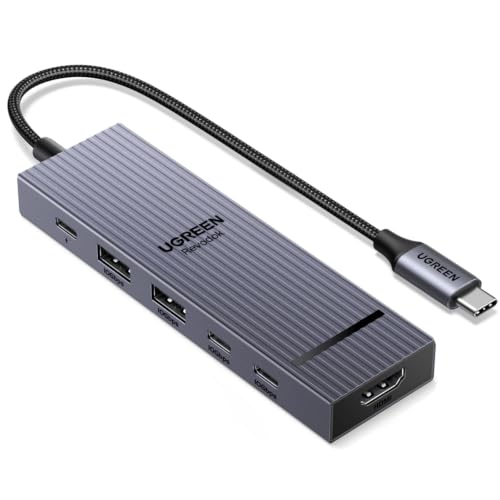
UGREEN Revodok Pro USB-C Hub 6-in-1 (10Gbps)
★★★★★ 4.4 / 5 Fastest data
This one is the pick when you move big files off an SSD, since its USB-A and USB-C data ports run at 10Gbps rather than the 5Gbps that most hubs top out at, which roughly halves the wait on a large transfer. It pairs that with a 4K 60Hz HDMI output and a card reader, so it is a compact hub that does not make you trade speed for a slim shape.
Data USB-A and USB-C at 10GbpsVideo HDMI up to 4K 60HzCards SD and TF readerCharging USB-C PD pass-through
- 10Gbps ports move large files quickly
- 4K 60Hz HDMI for a smooth screen
- Compact for a hub with fast data
- Six ports is fewer than a desk dock
- One HDMI, so a single monitor
Best for: moving big files fast from a small hub
Belkin 100W 10Gbps Multiport USB-C Hub
★★★★★ 4.3 / 5 Best build quality
Belkin is the pick if you want a known brand with a solid metal shell and clear support, and this model still keeps the specs that matter with 10Gbps data ports and up to 100W of pass-through charging. It suits an iPad or a laptop that you want to dock and charge from one cable, with an HDMI output and card reader for the usual desk tasks.
Data USB ports at 10GbpsCharging Up to 100W PD pass-throughVideo HDMI outputBuild Metal housing, brand support
- Sturdy metal build from a known brand
- 10Gbps data and up to 100W charging
- Works well with iPad as well as laptops
- Costs more for the brand name
- Single HDMI limits you to one screen
Best for: a well-built hub with reliable brand support
Satechi 4-in-1 USB-C Hub (100W PD Pass-Through)
★★★★★ 4.3 / 5 Best travel-slim
The Satechi is the one to slip in a bag because it keeps the port count low and the body thin, yet still carries up to 100W of pass-through so your laptop charges through it on the road. Four ports is enough for a hotel setup of one screen, a charger, and a USB accessory, without the bulk of a nine-port dock you would leave at home.
Ports 4 total, travel sizedCharging Up to 100W PD pass-throughVideo HDMI outputBuild Slim aluminum body
- Slim and light for a bag
- Up to 100W pass-through on the go
- Simple four-port layout, nothing wasted
- Only four ports for a busy desk
- No card reader on this model
Best for: a thin hub that travels with a laptop
UGREEN USB-C Hub 5-in-1 (4K HDMI, 100W PD)
★★★★★ 4.2 / 5 Best value
This is our value pick for anyone who mainly wants a screen and a few USB-A ports without paying for extras they will not use. It gives you a 4K HDMI output, three USB-A ports for a keyboard, mouse, and drive, and a port that takes up to 100W of pass-through, which covers the basics a laptop user needs day to day.
Video 4K HDMI outputUSB-A 3 ports for accessoriesCharging Up to 100W PD pass-throughForm Compact five-port hub
- Covers screen and USB gear for less
- Up to 100W pass-through included
- Simple layout that is easy to travel with
- No card reader in this set
- HDMI refresh caps lower than the 60Hz picks
Best for: the basics of a screen and USB-A ports on a budget
Anker USB-C Hub 6-in-1 with Ethernet
★★★★★ 4.2 / 5 Best for wired Ethernet
Pick this Anker if a stable wired connection matters more than fast data, because it adds a Gigabit Ethernet port that a plain hub leaves out, which is worth having for video calls or a spotty office Wi-Fi. It rounds that out with an HDMI output, two USB-A ports, and a USB-C port for pass-through charging, so it stays a tidy single-cable setup.
Network Gigabit Ethernet portVideo HDMI outputUSB-A 2 ports for accessoriesCharging USB-C power pass-through
- Built-in Ethernet for a stable connection
- Tidy six-port single-cable setup
- Trusted brand at a fair outlay
- USB-A data is standard, not 10Gbps
- One HDMI, so a single external screen
Best for: adding a wired network port to a laptop
The best USB-C hub for you is decided by four things more than the name on the box: the port mix you actually need, how much pass-through charging it delivers, whether you need one screen or truly two, and whether it lives in a bag or on a desk. Our picks below run from a compact 4K 60Hz Anker to a nine-port desk dock, a fast 10Gbps UGREEN, a sturdy Belkin, a slim Satechi for travel, a value UGREEN, and an Anker with Ethernet, so you can match the hub to your laptop and your desk rather than guess.
Start with the port mix you will really use
Before anything else, count what you plug in. HDMI covers a monitor, USB-A handles a keyboard, mouse, and older drives, and an SD or microSD reader matters if you shoot photos or video. A four-port hub like the Satechi keeps things thin for travel, a six-port UGREEN or Anker suits a laptop bag, and a nine-port docking station makes sense only when a full desk of accessories stays connected all day. Buying more ports than you use adds bulk and cost, while too few leaves you unplugging one thing to reach another, so match the count to the gear you own rather than the biggest number on the shelf.
Pass-through charging wattage, told straight
Most of these hubs carry a USB-C port that charges your laptop while everything else stays plugged in, which is the pass-through figure. The catch is that the hub keeps some of that power for itself, so a hub rated at 100W delivers a little less to the laptop in practice. A thin ultrabook is fine on a lower rating, but a 15 or 16 inch laptop under load wants a hub near 100W like the docking station, the UGREEN 5-in-1, or the Belkin. Check your laptop's own charger wattage and pick a hub that meets or beats it, and treat the label as a ceiling rather than the exact number you will see.
One monitor or two, without the wishful thinking
This is where a lot of buyers get caught out. A simple USB-C hub, including every pick here, passes your laptop's single video signal to one HDMI output, so it drives one external screen and not two. Running two separate monitors usually needs a laptop that supports it plus a DisplayLink dock with its own driver, which is a different and pricier class of product than a plug-and-play hub. If a single big screen is all you want, any of our picks with 4K 60Hz HDMI does the job well. If you genuinely need dual displays, confirm both the laptop and a dedicated dock list dual-display support before you buy rather than hoping a multiport hub will manage it.
Travel-slim or a stay-put desktop dock
The last question is where the hub lives. A slim hub such as the Satechi 4-in-1 keeps the port count and the thickness down so it slides into a bag for hotel and cafe work, and it still carries enough pass-through to charge on the road. A nine-port docking station is built to sit on a desk with a keyboard, mouse, drive, and monitor left plugged in, so one cable reconnects the whole setup when you sit down. Fast data leans on the 10Gbps UGREEN, a wired network points to the Anker with Ethernet, and brand support points to the Belkin. Weigh the port mix, the charging, and the size together, and any of these chosen picks will turn a one-port laptop into a proper workspace.
Questions people ask
What does a USB-C hub actually do?
A USB-C hub takes one USB-C port on your laptop or tablet and splits it into several, so a single cable gives you an external monitor over HDMI, a few USB-A ports for a keyboard, mouse, and drive, a card reader, and often a spot to charge the laptop at the same time. It turns a thin machine with one or two ports into a workable desk without any drivers on most computers.
Which USB-C hub is the best pick overall?
Our top choice is the Anker 7-in-1 because its HDMI runs 4K at 60Hz rather than the 30Hz that many cheaper hubs push at 4K, and its seven ports cover a monitor, USB-A gear, a card reader, and pass-through charging in one compact body. If the hub instead lives on a desk with a full set of accessories, the 9-in-1 docking station has more room, and the UGREEN Revodok Pro is the pick when fast 10Gbps file transfers matter most.
Can a USB-C hub run two monitors?
Most of the hubs here, including our picks, drive a single external monitor because they pass the laptop's one video signal straight through to HDMI. Running two separate screens usually needs a laptop that supports it plus a DisplayLink dock with its own driver, which is a different and pricier product than a simple hub. If dual monitors are the goal, check that both the laptop and the dock list dual-display support before buying rather than assuming a multiport hub can do it.
How much pass-through charging power do I need?
Pass-through is the wattage the hub can send to your laptop while everything else stays plugged in, and the hub always keeps some for itself, so the number on the box is not all delivered. A thin ultrabook is happy on the lower end, while a 15 or 16 inch laptop under load wants a hub rated near 100W like several of our picks. Match the hub's rating to your laptop's own charger wattage and expect the delivered figure to sit a little below the label.
What is the difference between 5Gbps and 10Gbps USB ports?
The speed rating is how fast data moves through the USB-A and USB-C data ports. A 5Gbps port, common on most hubs, is fine for a keyboard, mouse, and everyday drives, while a 10Gbps port like the one on the UGREEN Revodok Pro roughly halves the wait when you copy large files off a fast SSD. If you mostly plug in accessories, 5Gbps is plenty; if you move big media files often, the faster ports are worth it.
Do I need HDMI 4K at 60Hz or is 30Hz fine?
The refresh rate is how many times the screen updates per second, and 60Hz looks smooth for scrolling, video, and general desktop work while 30Hz can feel slightly laggy at 4K. A cheaper hub often caps 4K output at 30Hz, so if you run a 4K monitor look for a hub that states 4K 60Hz like our top picks. For a 1080p screen the refresh is less of an issue, since most hubs handle that resolution comfortably.
Should I get a slim travel hub or a full desktop dock?
It comes down to where the hub lives. A slim hub like the Satechi 4-in-1 keeps the port count low and the body thin so it rides in a bag for hotel and cafe work, while a nine-port docking station is meant to sit on a desk with a keyboard, mouse, drive, and screen left plugged in. Some people keep both, a small one for the road and a larger one at the desk, since each does its own job better than a compromise in between.
How did we choose the USB-C hubs in this guide?
We compared the port mix each hub offers, whether HDMI runs 4K at 60Hz or a lower refresh, the data speed of the USB ports, the pass-through charging wattage, and the size for desk versus travel, then matched each to a real use. Every product shown is a real current listing, and these are our chosen picks rather than lab tested claims, so treat the port mix and charging fit as the decisions that matter most for your setup.
The bottom lineSo which one?
The Anker 7-in-1 is our top choice because its 4K 60Hz HDMI keeps an external screen smooth where cheaper hubs drop to 30Hz, and seven ports handle a real desk in one compact plug. For a stay-put setup the 9-in-1 docking station has more room and up to 100W of pass-through, the UGREEN Revodok Pro wins on 10Gbps data, and the Belkin is the well-built brand pick. The Satechi 4-in-1 is the slim travel option, the UGREEN 5-in-1 covers the basics for less, and the Anker 6-in-1 adds a wired Ethernet port. Let the port mix, the charging wattage, and one-screen-versus-desk lead the decision, and remember these are our chosen picks rather than lab tested claims.