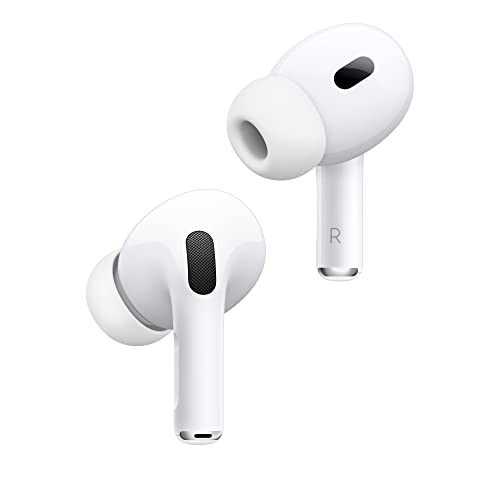
First, clean the earbud mesh with a dry cotton swab and check the audio balance on your phone. If that fails, reset the earbuds by holding the button on the case for 10 seconds.
Why One Earbud Stops Producing Sound
It is frustrating when your wireless earbuds suddenly play from only one side. The problem is common and usually fixable at home. Our editorial team compared specifications, buyer feedback and key decision factors to bring you the most reliable troubleshooting steps.
Most often, the cause is physical: earwax or debris blocking the tiny mesh speaker grill. Other times, it is a software issue like an uneven audio balance or a Bluetooth glitch. Rarely, the battery in one bud fails or the internal wiring breaks. Understanding the cause helps you choose the right fix.
How to Fix One Earbud Not Working
1. Clean the Earbud and Charging Contacts
Earwax is the number one culprit. Over time, wax accumulates on the mesh and muffles or completely blocks sound. Use a dry, soft-bristled toothbrush or a cotton swab slightly dampened with isopropyl alcohol (70% or less). Gently brush the mesh and the metal charging contacts on the earbud and inside the case. Let everything dry completely before using.
2. Check Audio Balance Settings
Your phone may have the sound panned to one side. On iPhone, go to Settings, then Accessibility, then Audio/Visual, and make sure the balance slider is centered. On Android, go to Settings, then Accessibility, then Hearing aids or Audio balance. Move the slider to the middle. This is a quick fix that many people overlook.
3. Reset Your Earbuds
If cleaning does not help, a reset often clears Bluetooth glitches. For AirPods, place them in the case, close the lid, wait 30 seconds, then open the lid and go to Bluetooth settings on your phone, tap the "i" next to your AirPods, and select Forget This Device. Then press and hold the setup button on the back of the case for 15 seconds until the status light flashes amber, then white. Re-pair them. For Samsung Galaxy Buds, put them in the case and press and hold both touchpads for about 7 seconds until the LED blinks. For Sony WF-1000XM5, place both buds in the case, open the lid, and hold the touch sensors on both buds for 10 seconds. Consult your manual for exact steps.
4. Update Firmware
Outdated firmware can cause audio issues. Check the companion app for your earbuds (e.g., Apple's iOS settings, Samsung Wearable, Sony Headphones Connect, Jabra Sound+). If an update is available, install it with both earbuds in the case and the case near your phone. Updates often fix bugs that affect one side.
5. Reposition the Earbud and Check Fit
Sometimes the earbud is simply not seated properly in your ear. Try a different ear tip size. A poor seal can cause the audio to sound like it is coming from one side only, especially with active noise cancellation. Make sure the earbud is fully inserted and that the ear tip is clean.
6. Try a Different Device
Pair your earbuds with another phone or tablet. If the problem follows the earbuds, it is a hardware issue. If it disappears, the problem is with your original device's Bluetooth or settings.
Brand-Specific Fixes
Apple AirPods and AirPods Pro
For AirPods, first check the mesh for debris. Then reset as described above. Also, check the ear tip fit in the Bluetooth settings for AirPods Pro. If the issue persists, contact Apple Support; there is a known service program for some AirPods Pro models with sound issues.
Samsung Galaxy Buds
For Galaxy Buds, open the Samsung Wearable app, tap on the earbuds, and run the "Earbud self-test" under Diagnostics. This will tell you if the speaker is working. If not, clean the mesh and reset. If the test fails, you may need a replacement.
Sony WF-1000XM5
Sony earbuds have a "Sound quality mode" that can affect balance. In the Sony Headphones Connect app, go to Sound, then Sound Quality Mode, and select "Priority on Stable Connection" to see if that helps. Also, try resetting the buds as described.
Jabra Elite Series
For Jabra, use the Jabra Sound+ app to run a "HearThrough" test. If one side is dead, clean the speaker mesh with a dry cotton swab. Reset by placing both buds in the case and holding the multi-function buttons for 10 seconds.
When to Replace Your Earbuds
If you have tried all the above and one earbud still produces no sound, the internal speaker or battery is likely damaged. This can happen after a drop, water exposure, or normal wear. In many cases, it is more cost-effective to replace the entire set than to buy a single earbud, which is often not available separately. Check the warranty first; many brands offer a one-year limited warranty. If you are out of warranty, consider upgrading to a newer model with better durability. Before buying, read recent reviews on Amazon to see if others report similar issues after a few months.
Remember, most one-earbud issues are fixable with simple cleaning and a reset. Take your time and go through each step carefully. If you need a replacement, check the current price on Amazon for your preferred brand.