The Jabra Speak 510 UC is a compact, round speakerphone built for one job: turning a laptop, phone, or small meeting room into a shared call station without the tangle of headsets and cables. This review is editorial and spec based. We have not used this unit or run it in a room, so everything below reflects what the Amazon listing and Jabra describe, framed on paper rather than as hands-on experience. The goal is to help you decide whether the Speak 510 fits your calls before you buy, and to flag the details worth confirming on the live listing.
What it is
The Speak 510 is a portable, battery powered conference speakerphone. It is the size of a small saucer, with an omnidirectional microphone and a single speaker tuned for voice, plus a ring of touch controls for answering, muting, and volume. According to the listing it connects two ways: over Bluetooth to a phone or computer, or through an included USB adapter that pairs it to a laptop automatically. The idea is that you set it in the middle of a desk or a small table, everyone around it can be heard, and the single device replaces the thin microphone and tinny speakers built into most laptops. It ships with a travel pouch, which signals its intended use as a grab and go device rather than a fixed install.
Key features per the listing
Here is what Jabra and the Amazon listing highlight for this model. Treat the figures as listing claims to verify, not measured results.
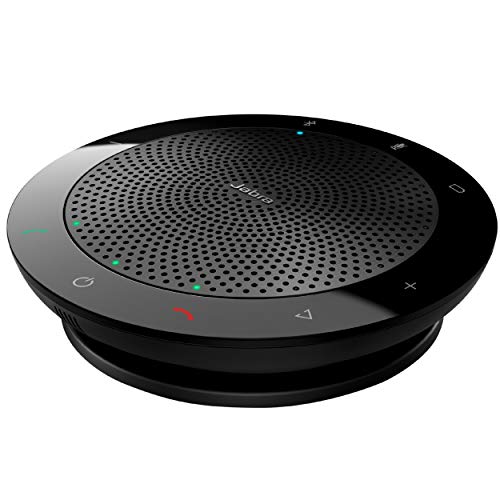
Jabra Speak 510 UC Wireless Bluetooth Speakerphone
A portable omnidirectional speakerphone that connects over Bluetooth or a USB adapter, with plug-and-play setup and a travel pouch, aimed at conference calls and small meetings.
Check price on Amazon- Dual connectivity. Bluetooth pairing for phones and computers, plus a USB adapter for plug-and-play use with a laptop. The listing positions both as simple, no driver setup.
- Omnidirectional microphone. A single mic designed to pick up voices from any direction around the device, which is the core promise for seating several people around one table.
- 360 degree sound. The speaker is voice tuned and radiates around the unit so everyone nearby hears the far side of the call.
- Unified Communications certification. This is the UC variant, described as optimized for a range of softphone and conferencing platforms. The product title specifically calls out certification for Zoom and Google Meet.
- Portable battery power. The listing emphasizes a built in rechargeable battery for calls away from a wall outlet and a long usable runtime for a full day of meetings. Confirm the exact rated hours on the current listing.
- Plug and play and integrated controls. On device buttons for answer, end, mute, and volume, so you are not reaching for the laptop mid call.
- Travel pouch included. Reinforces the portable, carry between desks or into a room use case.
Who it is for
On paper the Speak 510 is aimed squarely at a few groups. Remote and hybrid workers who spend their day on video calls are the obvious fit, since a dedicated speakerphone almost always sounds clearer than a laptop for both sides of the conversation. Travelers and people who hot desk benefit from the pouch and the small footprint, because the whole kit drops into a bag. Small teams in a huddle room or around a single desk are another target: the omnidirectional mic is meant to let three or four people share one device rather than crowd a laptop. It also suits anyone who simply wants to replace weak built in laptop speakers and microphones with something purpose built for voice. If your calls are mostly one to one from a quiet home office, it still works, though a headset may be all you actually need.
Strengths on paper
Judged by the listing, the strengths are coherent and match the product category. The omnidirectional pickup is the headline: a single mic that captures voices from around the unit is the right design for shared calls, and it is the feature that separates a real speakerphone from a laptop. Portability is a genuine advantage here, as the compact disc shape and the included pouch make it easy to carry between a home office, an office desk, and a client site. Plug-and-play setup lowers the friction that kills a lot of meeting hardware; if the USB adapter works as described, there is nothing to install. Finally, the UC certification matters: being validated for mainstream platforms, with Zoom and Google Meet named on the listing, reduces the risk of echo, dropouts, or mute button mismatches that plague uncertified accessories.
Things to check before you buy
A spec based review is only useful if it also tells you where to look closely. A few points deserve a second read on the live listing:
- Room size it realistically covers. This is a personal and small group device. For a large boardroom you likely want a bigger speakerphone or a room system with expansion mics. Match the pickup area to your table.
- Bluetooth versus USB mode. Behavior, pairing, and which platforms are supported can differ between wireless Bluetooth use and the wired USB adapter. Decide which mode you will live in day to day.
- Which UC platforms are certified. The title names Zoom and Google Meet. If your organization standardizes on a different platform, confirm the certification and optimization for that specific app.
- One device versus daisy chain. The Speak 510 is a single unit. If you ever need to link two speakerphones for a longer table, check whether that is supported on this model or whether a different Jabra model is required.
- Microphone range for a bigger table. The further a speaker sits from the mic, the quieter they are. Confirm the stated pickup radius against how far apart your group actually sits.
- Battery and wireless range figures. The listing frames long battery life and a wireless range through the adapter. Verify the exact rated numbers before you rely on them for all day use.
How it compares
It helps to place the Speak 510 against the two things people weigh it against. Compared with a headset, a speakerphone is the better choice when more than one person is in the room or when you dislike wearing something on your ears for hours; a headset, on the other hand, usually wins on raw privacy, noise isolation, and keeping background sound out of your own microphone. Compared with a full conference room system, the Speak 510 is the portable, lower complexity option: a room system with ceiling or expansion microphones and a dedicated codec will cover a large table far better, but it is fixed, costlier, and far more involved to set up. The honest framing is that the Speak 510 occupies the personal and small group slot. It is not trying to fill a boardroom, and it is more capable than a bare laptop. If your need sits in that middle band, it is in the right category; if you are at either extreme, look at a headset or a room system instead.
Verdict
Based on the listing, the Jabra Speak 510 UC reads like a sensible, focused speakerphone for personal use, hybrid work, travel, and small group calls. The feature set is internally consistent: omnidirectional mic, 360 sound, dual Bluetooth and USB connectivity, plug-and-play setup, portability with a pouch, and UC certification that names Zoom and Google Meet. We have not used it, so we cannot speak to real world voice clarity, echo handling, or battery endurance, and those are exactly the points we would confirm first. If you want one portable device to replace laptop audio for calls with one to a few people, it fits the brief on paper. For a large room or a multi platform standard, verify the certifications and pickup area first. You can review the current specifications, certifications, and buyer feedback for the Jabra Speak 510 on Amazon to confirm the details that matter for your setup.
Disclosure: This is an editorial, specification based review written from the manufacturer and Amazon listing, not from hands-on use. We have not tested this product. As an Amazon Associate we may earn from qualifying purchases made through links on this page, at no extra cost to you.