If you own a laptop, tablet, or handheld console with a USB-C port and your soundbar or receiver only accepts an optical cable, the Duttek USB C to Optical Audio Adapter is built to bridge that exact gap. This is an editorial overview based on the current Amazon listing and the published specifications, not a hands-on review, so treat it as a guide to what the product claims to do and, just as importantly, what you should confirm before you buy.
What it is
The Duttek USB C to Optical Audio Adapter is a short cable style converter with a USB-C plug on one end and a TOSLINK optical (also called SPDIF) connector on the other. According to the listing, its job is to take a digital audio stream from a USB-C source and output it as an optical digital signal that an optical input on a soundbar, television, or audio receiver can read. The listing describes it as unidirectional, meaning it is designed to send audio in one direction only: from the USB-C device out to the optical connector. It is not described as a two way device, so it is not meant to pull audio from an optical source back into a USB-C port.
The product is listed with a PCM stereo output rated up to 192KHz and 24bit, a cable length of roughly 7.87 inches, and example use cases that include a soundbar, a TV, and a PlayStation. Those are the facts the listing provides. Anything beyond them, such as how it behaves with a specific phone or operating system, is something you would need to verify against your own gear.
Key features
Here is what the current listing states, without any added claims:
- USB-C input connector and a TOSLINK optical (SPDIF) output connector.
- Unidirectional conversion, from the USB-C source to the optical output only.
- PCM stereo digital audio output, listed up to 192KHz and 24bit.
- A compact cable length listed at about 7.87 inches.
- Example target devices named in the listing: soundbar, TV, and PlayStation.
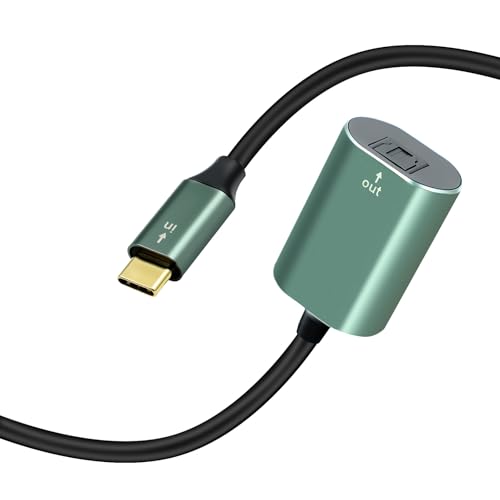
Duttek USB C to Optical Audio Adapter
Unidirectional USB-C to TOSLINK optical converter, listed with PCM stereo output up to 192KHz 24bit for soundbars, TVs, and consoles.
Check price on AmazonWho it is for
This adapter is aimed at people who want to connect a USB-C device to optical audio gear. The most common scenarios are sending sound from a USB-C laptop, tablet, mini PC, or console to a soundbar, an external digital to analog converter, or a home audio receiver that offers an optical input but no USB connection. If your audio equipment is a few years old and uses optical as its digital input, and your source device has moved on to USB-C, this is the kind of small bridge that can keep both ends talking to each other. It is a niche but real need, and the listing frames the product squarely around it.
It is less relevant if your source device and your audio gear already share a common port, such as HDMI or a direct optical output, because in that case you would not need a converter at all.
Strengths on paper
On specifications alone, a few things stand out. Keeping the signal in the digital domain all the way to the optical input means the conversion to analog happens inside your soundbar or receiver, where a dedicated converter usually lives, rather than relying on whatever analog output a small dongle might provide. The listed support for PCM up to 192KHz and 24bit covers common stereo music and most stereo TV and console output, so for a two channel setup the headroom on paper looks reasonable. The short cable is tidy and easy to tuck behind a desk or media unit, and the named use cases suggest it is intended for mainstream devices rather than obscure hardware. Because it is a simple passive style bridge in how it is presented, there is little to configure beyond plugging it in, assuming your source device cooperates.
Things to check
This is the part that matters most, because an adapter like this only works when the source device plays along. Please confirm the following before you rely on it:
- Your device must output digital audio over USB-C. Not every USB-C port carries a digital audio stream. Many ports are built for power and data only. If your laptop, phone, or console does not support USB-C digital audio output, this converter will not produce sound no matter how it is wired. Check your device documentation first.
- Supported format is stereo PCM. The listing describes PCM stereo output. That is fine for music and standard stereo sources, but it is not described as passing multichannel surround formats. If you were hoping to send a surround bitstream, confirm the format your setup needs and whether this adapter supports it.
- It is one direction only. The listing calls it unidirectional, USB-C to optical. It is not intended to work the other way around, so do not buy it expecting to feed an optical source into a USB-C device.
- Cable length is short. At about 7.87 inches, it is meant for gear that sits close together. If your source and your audio device are far apart, plan for that.
- Verify compatibility on the listing. Device support for USB-C audio varies widely between brands and models, so read the current Amazon listing, the compatibility notes, and recent buyer questions for your specific device before ordering.
How it compares
It helps to frame this against the two most common alternatives. Compared with a simple analog 3.5mm connection, this adapter keeps the audio digital until it reaches your soundbar or receiver, which means the final conversion to analog is handled by that equipment rather than by a small inline part. The trade off is that an analog cable will work from almost any headphone style output, while this converter depends on your device actually sending digital audio over USB-C. Compared with an HDMI connection, optical is audio only and, as listed here, stereo PCM, whereas HDMI can carry multichannel audio along with video. So if your goal is surround sound or a single cable for picture and sound, HDMI is a different tool. If your goal is specifically getting stereo digital audio from a USB-C source into an optical input, this adapter targets that narrow job. Rather than name a competing product, the honest comparison is really about matching the connector and the signal direction you actually have.
Verdict
As an editorial read of the listing, the Duttek USB C to Optical Audio Adapter looks like a sensible, purpose built bridge for one specific situation: a USB-C source that outputs digital audio feeding an optical soundbar, converter, or receiver. The listed specs, unidirectional USB-C to TOSLINK with PCM stereo up to 192KHz and 24bit, line up with that use case. The single biggest factor in whether it works for you is not the adapter itself but whether your device supports USB-C digital audio output in the first place, so that is worth confirming before anything else. If your gear fits the profile and you understand it is a one way, stereo PCM converter with a short cable, it is a reasonable candidate. Before buying, check the current listing to confirm the current specifications, compatibility notes, and connector details for your own setup.
This is an editorial overview based on the current Amazon listing and published specifications, not hands-on testing. ProductPickly may earn a commission from qualifying purchases made through links on this page.