The best WiFi routers for faster, steadier home internet
A good router is the quiet workhorse of a modern home. It decides how far your signal reaches, how many phones, laptops, consoles, and smart plugs can stay online at once, and whether a video call in the back bedroom holds together. This guide rounds up five routers that cover the most common situations, from a simple single-room setup to a whole-home mesh, a cable modem combo, and a future-ready WiFi 7 box. Every pick here is chosen from current Amazon listings, and the specifications we quote are the manufacturer and listing claims, not figures from any lab bench of ours.
We have deliberately kept the list short and useful. Rather than list a dozen near-identical models, we matched each router to a clear job: an all-round top pick, a mesh system for larger homes, a modem-router combo for cable internet, a wallet-friendly option, and a next-generation WiFi 7 choice. Read the pick that matches your home and your internet plan, then use the buying guide near the end to sanity-check your decision.
How we chose these WiFi routers
This is an editorial selection built from publicly available Amazon product listings. We did not run our own speed trials, and we are careful not to pretend otherwise. Instead, we compared the listed WiFi standard, the advertised speed rating, band layout, stated coverage, port counts, and mesh support across each model, then weighed those claims against the type of home and internet plan each router is built for. Speed ratings such as AX1800 or BE6500 are theoretical maximums that combine every band on the device. Your real-world throughput depends on your internet plan, your distance from the router, wall construction, and the age of the devices connecting to it. We flag that throughout so the numbers stay in context.
The picks at a glance
1. TP-Link Archer AX21 (AX1800 WiFi 6) - Top Pick and best WiFi 6
The Archer AX21 is the router most households should look at first. It runs the WiFi 6 standard with an AX1800 dual-band rating, which on the listing means roughly 1201 Mbps on the 5 GHz band and 574 Mbps on 2.4 GHz as theoretical maximums. For everyday streaming, gaming, and a house full of connected gadgets, that headroom is plenty, and WiFi 6 handles many simultaneous devices more gracefully than older WiFi 5 hardware. It carries four Gigabit LAN ports plus a Gigabit WAN port, works with the TP-Link app for setup, and supports OneMesh if you later want to add a compatible extender for more reach. As an all-rounder that balances current standard, speed, and simplicity, it earns both our top pick and our best WiFi 6 nod.
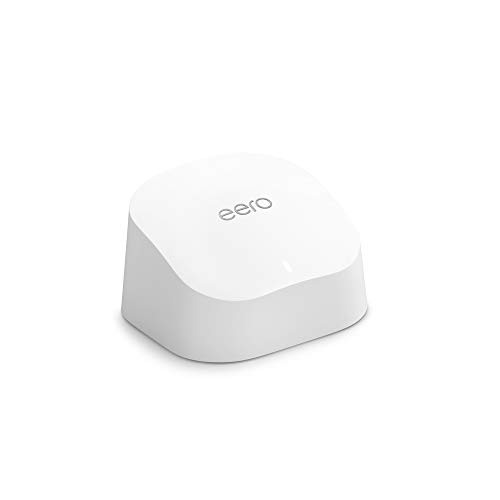
2. Amazon eero 6 - Best Mesh
If your trouble is range rather than raw speed, a mesh system usually beats a single router, and the eero 6 is a clean entry point. The listing states support for internet plans up to 900 Mbps, coverage up to 1,500 square feet from a single unit, and the ability to connect more than 75 devices. Because eero is expandable, you can start with one unit and add more to blanket a larger or awkwardly shaped home with one network name, no dead corners, and automatic handoff as you move around. Setup runs through the eero app, and the system handles its own updates in the background. For larger homes or tricky layouts, this is the pick.
3. NETGEAR Nighthawk CAX30 Modem Router Combo - Best Modem-Router Combo
The Nighthawk CAX30 folds a DOCSIS 3.1 cable modem and a WiFi 6 router into one box, which is a tidy answer if you are on cable internet and want to stop renting a separate modem from your provider. The listing rates it at AX2700, roughly 2.7 Gbps across its bands as a theoretical maximum, and notes compatibility with major cable providers including Xfinity, Spectrum, and Cox. A combo like this suits cable connections specifically, so confirm your provider and plan support it before buying. For the right home it reduces clutter and cabling to a single unit while still delivering a current-generation WiFi 6 network.
4. TP-Link Archer A6 (AC1200) - Best Budget
Not every home needs the newest standard. The Archer A6 runs WiFi 5 with an AC1200 dual-band rating and Gigabit Ethernet, which is enough for browsing, HD streaming, and a modest number of devices in a smaller space. It is the value pick for a spare room, a first apartment, or a secondary network where spending on WiFi 6 or WiFi 7 would be overkill. You give up the device-density and efficiency gains of the newer standards, so it is best kept to lighter loads, but as an honest, no-frills router it does its job without fuss.
5. TP-Link BE400 (BE6500 WiFi 7) - Best WiFi 7 and most future-proof
The BE400 is the forward-looking choice. It is a dual-band WiFi 7 router with a BE6500 rating, and WiFi 7 brings wider channels and more efficient airtime handling that can pay off as more WiFi 7 phones and laptops arrive. The practical catch is that you only unlock the newest-standard benefits when your client devices also speak WiFi 7, and your internet plan has to be fast enough to feel the difference. If you are buying a router to keep for years and want to be ready for what is coming, this is the pick to grow into rather than out of.
How to choose a WiFi router
WiFi 5 vs WiFi 6 vs WiFi 7. The standard sets the ceiling for how the router talks to your devices. WiFi 5 (the AC generation, as on the Archer A6) is fine for light use in a small space. WiFi 6 (the AX generation, as on the Archer AX21 and the CAX30) is the sensible default for most homes today because it handles many devices at once far better. WiFi 7 (the BE generation, as on the BE400) is the newest and most future-ready, but you see its full advantage only when your phones, laptops, and plan can keep up.
Standalone vs mesh vs modem-router combo. A standalone router is the simplest and usually the best value for a small or medium home. A mesh system like the eero 6 uses two or more units to spread one network across a larger or multi-floor home with no dead zones, which is the better route when coverage is your real problem. A modem-router combo like the CAX30 merges the modem and router into one device for cable internet, cutting clutter and a rental fee, but it ties the two functions together, so a fault or an upgrade affects both.
Match the router to your plan and your home. There is little point paying for a multi-gigabit router if your internet plan tops out well below that, and no router makes your connection faster than the plan you pay for. Size matters too: a single router suits a flat or a compact house, while a sprawling or multi-story home leans toward mesh. Think about the number of devices as well, since a modern home with dozens of connected gadgets benefits from the device handling in WiFi 6 and WiFi 7.
Bands and speed ratings. Dual-band routers use 2.4 GHz for range and 5 GHz for speed, and labels like AX1800, AX2700, or BE6500 add the bands together into a single headline figure. Treat those as theoretical maximums rather than a promise. Real throughput is lower and depends on distance, walls, interference, and the devices connecting.
Ports, security, and app features. Check the Ethernet ports if you plan to hard-wire a desktop, console, or network-attached storage, and look for a faster WAN port if your plan is very quick. Most of these routers are managed through a phone app that walks you through setup, guest networks, parental controls, and firmware updates. Keeping that firmware current is one of the easiest ways to stay secure, so pick a router from a maker that updates regularly.
When to upgrade. If your current router is several years old, struggles when the house is busy, drops the signal in the far rooms, or no longer receives security updates, it is time. Moving up a standard, or adding mesh for coverage, is usually the single biggest improvement you can make to home WiFi short of changing your internet plan.
A quick note on the numbers
Everything here is drawn from current product listings. The WiFi standards, speed ratings, coverage figures, and port counts are listing claims, and the speed ratings in particular are theoretical maximums that you are unlikely to hit in daily use. A modem-router combo makes the most sense on a cable internet connection, while a mesh system is the stronger choice for larger homes where coverage, not peak speed, is the thing that keeps letting you down. Always confirm provider compatibility and your plan speed before you buy.
The bottom line
For most homes, the TP-Link Archer AX21 is the easiest router to recommend: current WiFi 6, solid speed headroom, and a friendly app. Choose the eero 6 if coverage across a larger home is your pain point, the NETGEAR CAX30 if you are on cable and want to combine modem and router, the Archer A6 if you want a dependable budget option for a small space, and the TP-Link BE400 if you want to step onto WiFi 7 and keep your router relevant for years. Match the pick to your home, your plan, and the devices you actually own, and any of these will give you a steadier network.