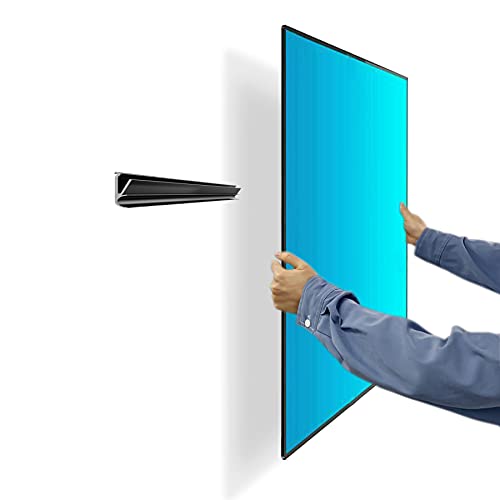
A good TV wall mount turns an ordinary wall into a clean, glare-friendly home for your screen, frees up the space a stand would eat, and lets you angle the picture toward the sofa instead of the ceiling. The catch is that "TV wall mount" covers everything from a slim fixed bracket for a bedroom panel to a heavy dual-arm mount that swings a large living-room TV out from a corner. The right choice depends on your screen size, its weight, the VESA hole pattern on the back, and whether you can anchor into studs or need a no-stud solution.
This roundup gathers mounts that cover the common jobs most people actually face: a versatile full-motion pick for mid-size TVs, a long-reach articulating arm for bigger screens, a low-profile tilting mount for very large panels, a renter-friendly no-stud option, a compact mount for small and medium displays, and a straightforward value pick. Every size range, VESA rating, and weight capacity below comes straight from the current Amazon product listing, so treat them as listing claims and always confirm the numbers against your own TV before you buy.
How we chose these TV wall mounts
These are editorial picks drawn from current Amazon listings, not lab results. We did not mount or load-test these brackets ourselves. Instead, we compared the published specifications that matter most for a safe, usable install: the supported TV size range, the maximum VESA hole pattern, the rated weight capacity, the type of motion (fixed, tilting, or full motion), and how the mount attaches to the wall. We favored mounts with clearly stated size, VESA, and weight limits, a sensible motion type for the job, and features like quick-release locks, level adjustment, and cable routing that make daily life easier. Where a listing leaves a number vague, we say so rather than guess.
Our top picks: TV wall mounts
1. ELIVED Full Motion TV Wall Mount (26 to 60 inch) - Top Pick
The ELIVED full-motion mount lands as our overall pick because it fits the size of TV most living rooms actually own and still offers the flexibility of swivel, tilt, and extension. The listing rates it for 26 to 60 inch TVs, a maximum VESA pattern of 400x400mm, and a weight capacity up to 77 lbs. That combination covers the vast majority of mainstream flat panels. If your screen falls in that range and you want to pull the picture off the wall and angle it toward a seat, this is the easy recommendation to start with. As always, check your TV's own VESA pattern and weight before ordering.
2. USX MOUNT Full Motion TV Wall Mount (32 to 70 inch) - Best Full-Motion
When you want maximum articulation for a larger screen, the USX MOUNT dual-arm design is built for it. The listing covers 32 to 70 inch TVs, a maximum VESA of 400x400mm, and a weight capacity up to 99 lbs, with dual articulating arms that swivel, tilt, and extend so you can position a big TV across a room or pull it out from a corner. It is specified to fit 12 inch or 16 inch wood studs. If reach and viewing-angle flexibility matter more than a flush, minimal profile, this is the full-motion option to look at.
3. IWORKBOARD Tilting TV Wall Mount (32 to 90 inch) - Best for Large TVs
Very large TVs are heavy, and for those a low-profile tilting mount is often the smarter, more stable choice than a long arm. The IWORKBOARD tilting mount is listed for 32 to 90 inch TVs, a maximum VESA of 600x400mm, and a hefty weight capacity up to 132 lbs. It sits close to the wall for a clean look, adds enough downward tilt to cut glare from windows or high placement, and includes a safe-lock and quick-release system. The listing notes support for stud spacing up to 24 inch, which helps when your studs do not line up with the TV. Confirm your panel's VESA and weight against these listed limits first.
4. No Stud TV Wall Mount (fits 12 to 55 inch) - Best No-Stud, Renter-Friendly
Renters and anyone facing a wall with no usable studs have a tougher problem, and this no-stud drywall mount is aimed squarely at it. The listing describes a studless, no-drill, no-screw drywall install for 12 to 55 inch TVs with a weight capacity up to 99 lbs, and it ships with the hardware and levels you need. A no-stud mount relies entirely on its drywall anchoring system, so staying well within the stated size and weight rating is especially important here. Follow the included instructions exactly and do not push past the listed limits. If you can hit studs, a stud mount is still the sturdier route.
5. Pipishell Full Motion TV Wall Mount (13 to 43 inch) - Best for Small and Medium TVs
Small and medium screens, including monitors and devices like the Echo Show, have different needs than a 65 inch panel, and the Pipishell full-motion mount is sized for them. The listing covers 13 to 43 inch flat and curved screens, a maximum VESA of 200x200mm, and a weight capacity up to 44 lbs, with rotation, swivel, tilt, and extension. That full range of motion is genuinely useful on a bedroom, office, or kitchen screen you reposition often. Because the VESA and weight ratings are smaller here, double-check that your compact TV or monitor falls inside them.
6. Amazon Basics Full Motion TV Wall Mount (26 to 55 inch) - Best Value
For a no-drama, budget-conscious choice, the Amazon Basics articulating mount keeps things simple. The listing covers 26 to 55 inch TVs and flat panels up to 80 lbs, with swivel and tilt on a single-stud articulating arm, and it is described as VESA compatible. The listing does not state an exact maximum VESA number, so verify your TV's hole pattern against the product page before buying. If you want full-motion flexibility for a mid-size TV without a long feature list, this is a sensible value pick.
How to choose a TV wall mount
Fixed vs tilting vs full motion. A fixed (or low-profile) mount holds the TV flat and close to the wall for the cleanest look, but it does not move. A tilting mount angles the screen down, which is ideal when the TV sits above eye level, such as over a fireplace, and tilting designs are popular for very large panels because they stay stable and compact. A full-motion (articulating) mount swivels, tilts, and extends on an arm, letting you pull the TV out and point it anywhere, at the cost of a bulkier assembly and more weight hanging off the wall.
TV size and weight. Match the mount's listed size range to your screen's diagonal, and match the rated weight capacity to your TV's actual weight, which you can find in its manual or spec sheet. Leave headroom rather than sitting right at the maximum. Size range and weight capacity on every pick above are listing claims, so confirm them against your specific model.
VESA hole pattern. VESA is the spacing, in millimeters, of the four mounting holes on the back of your TV, such as 200x200, 400x400, or 600x400. Your TV's VESA pattern must fall within the mount's maximum VESA, or the bracket will not line up. Measure the horizontal and vertical distance between the holes, or check your TV's specs, before you buy.
Stud vs no-stud mounting. Anchoring into wood studs is the most secure way to hang a TV, and most mounts here are designed for 16 inch or 24 inch stud spacing. If your wall has no usable studs, a dedicated no-stud drywall mount like the one above is built for that, but it depends entirely on its anchoring system, so respect its size and weight rating strictly. Do not improvise a no-stud install with a stud mount.
Extension, swivel, and tilt range. On full-motion mounts, check how far the arm extends from the wall, how many degrees it swivels left and right, and how far it tilts. More reach means more flexibility but also more leverage on the wall. Pick the motion you will actually use.
Cable management and level adjustment. Small touches make a big difference day to day. Look for cable channels or clips to keep wires tidy behind the TV, and for post-install level adjustment, which lets you nudge the screen straight after it is hung without redoing the whole install. Several mounts here include quick-release locks that make connecting cables easier.
A quick fitment note
Before you order any mount, check three numbers against your TV: the supported size range, the rated weight capacity, and the VESA hole pattern, all of which are listing claims on these products. Mount into studs wherever you can, and if you use a no-stud drywall mount, stay strictly within its rated limits and follow the included instructions. We are not recommending any specific drilling or load technique beyond confirming VESA and weight and following the manufacturer's directions. When in doubt about your wall or your TV, consult the product instructions or a professional installer.
The bottom line
For most living rooms, the ELIVED full-motion mount is the easiest place to start thanks to its mainstream 26 to 60 inch range and 400x400mm VESA support. Step up to the USX MOUNT for long-reach articulation on larger screens, the IWORKBOARD tilting mount for very large and heavy panels, the no-stud mount for renters and studless walls, the Pipishell for small screens and monitors, and the Amazon Basics mount when you want full motion on a budget. Whichever you choose, match the size, weight, and VESA numbers to your own TV first, and let the mount's own instructions guide the install.