Monitors
Best Monitors for Work and Gaming
4 picks compared
8 min read
ProductPickly is reader-supported. When you buy through links on our site, we may earn an affiliate commission at no extra cost to you. It never changes our picks.
?How we pickedWe compare published specifications, safety certifications and thousands of verified owner reviews, and we do not physically test every unit. Read the full process in our review methodology.
Dell S2722QC 27-inch 4K USB-C Monitor
★★★★★ 4.6 / 5 Best Overall
The S2722QC is a well-rounded 27-inch 4K monitor that fits neatly into a home office. Its IPS panel keeps colors consistent across wide viewing angles, and a single USB-C cable can carry video while charging a laptop. Built-in speakers keep the setup tidy for calls and casual media.
Screen size 27 inchesResolution 4K UHD, 3840 x 2160Panel IPSConnectivity USB-C with power, HDMI
- Sharp 4K resolution on a crisp IPS panel
- USB-C connection carries video and charges a laptop
- Built-in speakers reduce desk clutter
- 60Hz refresh is not ideal for fast-paced gaming
- Stand adjustments cover tilt and height but little else
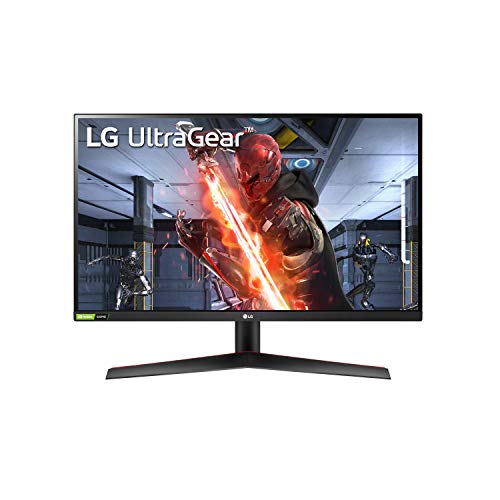
LG UltraGear 27GN800-B
★★★★★ 4.5 / 5 Best Value
The 27GN800-B delivers a fast 144Hz QHD experience without a premium price. Its IPS panel keeps colors punchy for both gaming and everyday work, and it supports adaptive sync to reduce tearing. For the money, it is one of the easiest gaming monitor recommendations to make.
Screen size 27 inchesResolution QHD, 2560 x 1440Refresh rate 144HzPanel IPS
- Fast 144Hz refresh at sharp QHD resolution
- IPS panel keeps colors vivid and consistent
- Adaptive sync support reduces screen tearing
- Stand offers tilt only, so many users add a mount
- HDR support is basic rather than a true highlight
Samsung Odyssey G7 32-inch
★★★★★ 4.5 / 5 Best for Gaming
The Odyssey G7 is built for gamers who want speed and immersion. Its 240Hz VA panel and aggressive 1000R curve wrap the action around your view, while the high contrast makes dark scenes pop. It supports both major adaptive sync standards for smooth play.
Screen size 32 inchesResolution QHD, 2560 x 1440Refresh rate 240HzPanel Curved VA, 1000R
- Very fast 240Hz refresh rate for competitive play
- Deep contrast from the VA panel
- Immersive 1000R curve pulls you into games
- The steep curve is not for everyone, especially for work
- No USB-C input for laptop connections
LG 34WN80C-B Ultrawide
★★★★★ 4.4 / 5 Best Ultrawide
The 34WN80C-B gives you a 34-inch ultrawide canvas that is ideal for multitasking and spreadsheets. A single USB-C connection handles video and laptop charging, and the gentle curve keeps the far edges comfortable to read. It is a productivity-first display rather than a gaming panel.
Screen size 34 inches ultrawideResolution 3440 x 1440Panel Curved IPSConnectivity USB-C with power, HDMI
- Ultrawide space is excellent for multitasking
- USB-C carries video and charges a laptop
- Gentle curve keeps the edges easy to read
- 60Hz refresh limits fast gaming
- The curved ultrawide shape takes up desk depth
What to look for in a monitor
Match the panel to your main task. Work and creative users benefit from higher resolution and accurate IPS color, while gamers should prioritize refresh rate and adaptive sync. Screen size and desk space then narrow the field, since a bigger panel needs more viewing distance.
Resolution and screen size
Resolution and size work together. A 27-inch screen looks great at QHD or 4K, while larger panels benefit from 4K to stay sharp. Ultrawide monitors trade a taller image for extra horizontal room, which is ideal for side-by-side windows.
Refresh rate and response for gaming
Higher refresh rates make motion look smoother, which matters most in fast games. Look for 144Hz as a solid baseline and 240Hz for competitive play, and pair it with adaptive sync to cut tearing. For office work, a standard 60Hz panel is perfectly fine.
Ports and connectivity
Check that the monitor has the ports your devices use. USB-C with power delivery is a big convenience for laptops, while desktops rely on HDMI or DisplayPort. If you plan to connect several devices, count the inputs before you buy.
Common mistakes to avoid
Do not chase 4K on a small screen you will run at scaled settings, and do not buy a high refresh panel if your computer cannot drive it. Also check the stand, since many affordable monitors offer tilt only and a mount adds cost. Read the panel type so you know what to expect from viewing angles and contrast.
How we picked
We compared current, US-available models on the specifications that matter, alongside verified owner feedback. This is a research-based comparison; we did not physically test every product. Confirm the exact model and its current recall status on cpsc.gov before buying.
Questions people ask
Is 4K or a higher refresh rate more important?
It depends on your use. For detailed work, photo editing and reading, 4K sharpness pays off. For fast gaming, a higher refresh rate like 144Hz or 240Hz matters more, and QHD is a common balance that keeps games smooth.
What size monitor should I get for a desk?
A 27-inch monitor suits most desks and pairs well with QHD or 4K resolution. If you multitask heavily, a 32-inch or a 34-inch ultrawide gives more room. Just check that your desk depth lets you sit far enough back to view the whole screen comfortably.
Do I need a monitor with USB-C?
USB-C is very convenient if you use a laptop, because one cable can carry video and charge the laptop at the same time. If you use a desktop with a dedicated graphics card, HDMI or DisplayPort is usually all you need.
The bottom lineSo which one?
The Dell S2722QC is our best overall pick for its sharp 4K image and handy USB-C charging that fits almost any home office. Pick the LG 27GN800-B to save money on a fast gaming panel, the Samsung Odyssey G7 for high refresh immersion, or the LG 34WN80C-B ultrawide for serious multitasking.