Mechanical Keyboards
Best Mechanical Keyboards for Typing and Gaming
4 picks compared
8 min read
ProductPickly is reader-supported. When you buy through links on our site, we may earn an affiliate commission at no extra cost to you. It never changes our picks.
?How we pickedWe compare published specifications, safety certifications and thousands of verified owner reviews, and we do not physically test every unit. Read the full process in our review methodology.
Keychron K8 Pro
★★★★★ 4.7 / 5 Best Overall
The K8 Pro hits the sweet spot for most people who want a serious upgrade without a lot of fuss. It runs wireless over Bluetooth or wired over USB-C, works with both Mac and Windows, and its hot-swappable sockets let you change switches without soldering. QMK and VIA support means you can remap keys and build macros in your browser.
Layout Tenkeyless, 87 keysConnectivity Bluetooth and USB-C wiredSwitches Hot-swappableCompatibility Mac and Windows
- Hot-swappable switches let you customize the typing feel over time
- Works wireless over Bluetooth and wired over USB-C
- Fully programmable with QMK and VIA for remapping and macros
- Tall profile is more comfortable with a separate wrist rest
- Tenkeyless layout drops the number pad some office users want
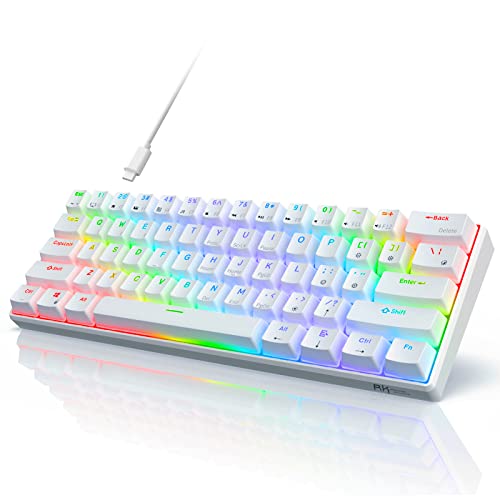
Royal Kludge RK61
★★★★★ 4.3 / 5 Best Value
The RK61 is a compact 60 percent board that proves you do not have to spend a lot to get a real mechanical feel. It offers triple connectivity across Bluetooth, a 2.4GHz dongle and USB-C, and the sockets are hot-swappable so you can experiment with switches. The tiny footprint frees up desk space for a mouse.
Layout 60 percent, 61 keysConnectivity Bluetooth, 2.4GHz and USB-CSwitches Hot-swappableBacklight RGB
- Very affordable entry into mechanical keyboards
- Compact 60 percent size saves desk space
- Triple connectivity with Bluetooth, wireless dongle and wired
- No dedicated arrow keys without using a function layer
- Companion software feels basic compared to bigger brands
Razer BlackWidow V4 Pro
★★★★★ 4.6 / 5 Best for Gaming
The BlackWidow V4 Pro is built for gamers who want dedicated controls at their fingertips. It adds a command dial and macro keys, a magnetic plush wrist rest and Razer's mechanical switches with per-key lighting. It is a full-size board, so it also handles spreadsheets and number entry without compromise.
Layout Full size with macro keysConnectivity USB wiredSwitches Razer mechanicalBacklight Per-key RGB
- Command dial and dedicated macro keys for shortcuts
- Per-key RGB lighting with underglow
- Magnetic plush wrist rest included
- Full-size footprint takes up significant desk space
- Wired only, with no wireless mode
Keychron Q1 Pro
★★★★★ 4.7 / 5 Premium Pick
The Q1 Pro is for people who care about how a keyboard sounds and feels as much as how it works. Its CNC aluminum case and gasket-mounted plate give a softer, more cushioned typing experience, and it stays fully programmable with QMK and VIA. It also adds wireless connectivity to that premium build.
Layout 75 percent compactBuild CNC aluminum, gasket mountConnectivity Bluetooth and USB-C wiredSoftware QMK and VIA
- CNC aluminum case with a premium heft
- Gasket mount gives a cushioned, quieter typing feel
- Wireless plus full QMK and VIA customization
- Heavy, so it is not meant to travel
- Priced well above a starter mechanical board
What to look for in a mechanical keyboard
Start with switch type, since it defines the feel. Linear switches are smooth and quiet, tactile switches have a noticeable bump, and clicky switches add sound. Also decide on a layout and whether you want wireless, because those two choices shape daily use more than anything else.
Switches and hot-swap sockets
Switches come in many flavors, but the bigger decision is whether the board is hot-swappable. A hot-swap board lets you try different switches without soldering, so you are not locked into one feel forever. If you are new to mechanical keyboards, hot-swap is a safe way to learn what you like.
Wired, wireless or both
Wired keyboards give the most consistent response and never need charging, which many gamers prefer. Wireless boards reduce cable clutter and pair with laptops and tablets, and many now offer both modes. If you switch between devices, look for multi-device Bluetooth plus a wired option.
Common mistakes to avoid
Do not buy the flashiest board without checking the layout, since a missing number pad or arrow cluster can frustrate you daily. Avoid ignoring keycap material and profile, because cheap keycaps wear shiny fast. And remember tall boards feel better with a wrist rest, so budget for one if needed.
Who each type is for
A tenkeyless or 75 percent board suits most home office and mixed-use setups. Gamers who use macros will appreciate a full-size board with dedicated keys, while minimalists and small desks benefit from a 60 percent layout. Enthusiasts who want the best feel should look at gasket-mounted aluminum boards.
How we picked
We compared current, US-available models on the specifications that matter, alongside verified owner feedback. This is a research-based comparison; we did not physically test every product. Confirm the exact model and its current recall status on cpsc.gov before buying.
Questions people ask
Are mechanical keyboards worth it over a regular keyboard?
For most people who type a lot, yes. Mechanical switches give clearer feedback, tend to last longer, and let you pick a feel you like, whether that is clicky, tactile or smooth. If you only type occasionally, a good membrane keyboard may be enough.
What does hot-swappable mean and why does it matter?
Hot-swappable means the switches sit in sockets you can pull out and replace by hand, with no soldering. It matters because you can change the typing feel later or replace a failed switch without buying a whole new keyboard.
What is the difference between full-size, tenkeyless and 60 percent?
Full-size includes the number pad, tenkeyless drops it to save space, and 60 percent also removes the arrow and function rows for the smallest footprint. Choose based on how often you use the number pad and how much desk space you want back.
The bottom lineSo which one?
The Keychron K8 Pro is our top overall pick because it balances wireless flexibility, hot-swappable switches and full programmability for almost any desk. Choose the Royal Kludge RK61 to spend less, the Razer BlackWidow V4 Pro for gaming controls, or the Keychron Q1 Pro if premium feel and sound matter most.