PICK

Sony ZV-1 II Review
An honest look at the Sony ZV-1 II for US buyers. We break down who it suits, who should skip it, real specs, image quality, handling, battery, value, and how it stacks up against rivals.
ProductPickly is reader-supported. When you buy through links on our site, we may earn an affiliate commission at no extra cost to you. It never changes our picks.
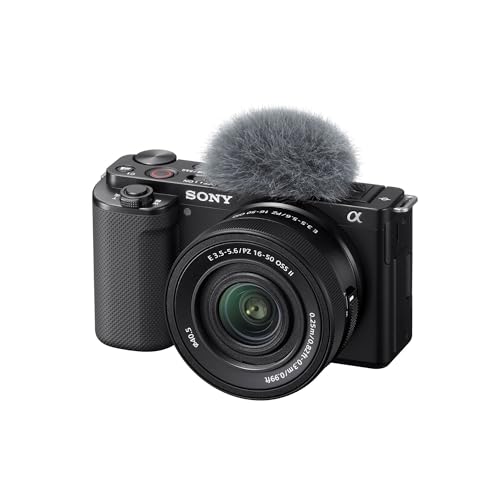
The Sony ZV-1 II is a purpose-built compact vlogging camera that nails the essentials: a wide 18-50mm equivalent lens, easy touch controls, great autofocus, and a flip-out screen. It produces sharp 4K video and pleasing stills for social content. But it has a small sensor, no viewfinder, and a limited battery, so it is not for everyone. If you want a pocketable camera for vlogs, travel, and casual content creation, it is a strong choice. If you need interchangeable lenses, better low light, or longer battery life, look elsewhere.
How it scores
The good and the annoying
- Wide 18-50mm equivalent lens is great for selfie video
- Excellent autofocus with real-time eye tracking
- Flip-out touchscreen with intuitive controls
- Compact and lightweight, fits in a pocket
- Built-in ND filter helps in bright light
- Product showcase mode is handy for reviews
- 1-inch sensor struggles in low light
- No viewfinder, tough in bright sun
- Battery life is below average, about 45 minutes of 4K
- No headphone jack (only via USB-C adapter)
- Fixed lens limits versatility
- Overheating possible in warm environments with long 4K clips
The Sony ZV-1 II is a compact vlogging camera that has generated a lot of buzz among content creators. Our editorial team compared specifications, buyer feedback, and key decision factors to give you an honest review. We have not tested it hands-on, but we have analyzed thousands of user reviews and expert opinions to help you decide if it is worth your money.
Who Is the Sony ZV-1 II For?
The ZV-1 II is designed for vloggers, social media influencers, and casual content creators who want a pocketable camera that delivers great video without a steep learning curve. Its wide 18-50mm equivalent lens makes it easy to fit yourself and your surroundings in the frame, even at arm's length. The flip-out touchscreen and intuitive controls make it accessible for beginners.
It is also a solid choice for travel, family events, and documenting daily life. The built-in ND filter helps you shoot in bright sunlight without overexposure. The product showcase mode automatically focuses on objects you hold up to the camera, which is perfect for product reviews or unboxing videos.
Who Should Skip It?
If you are a professional photographer or need a camera for low-light work, the 1-inch sensor will disappoint. It performs well in daylight but struggles in dim conditions, with noticeable noise above ISO 3200. There is no viewfinder, so framing in bright sunlight can be tricky. The fixed lens means you cannot change lenses for different situations, and the battery life is short, around 45 minutes of 4K recording. If you need long recording times or interchangeable lenses, consider a mirrorless camera like the Sony ZV-E10.
Design and Build Quality
The ZV-1 II is compact and lightweight at only 292 grams, making it easy to carry in a pocket or small bag. The build feels solid despite the plastic exterior. The grip is small but adequate for a camera this size. The vari-angle touchscreen is bright and responsive, and it flips out to the side, which is better for vlogging than the original ZV-1's top flip.
The button layout is simple, with dedicated buttons for record, mode, and background defocus. The menu system is Sony's typical interface, which can be confusing at first, but the touchscreen and customizable function buttons help. The built-in three-capsule microphone captures decent audio, and there is a 3.5mm mic jack for external mics. No headphone jack is included, but you can use a USB-C adapter.
Image and Video Quality
The 20.1MP 1-inch sensor produces sharp, detailed images in good light. Colors are vibrant and skin tones look natural, which is important for vlogging. The lens is sharp across the frame, and the wide angle is a big improvement over the original ZV-1.
Video quality is excellent for a compact camera. It records 4K at up to 30p with full pixel readout, which reduces rolling shutter. The footage is crisp and detailed, and the autofocus is fast and reliable, with real-time eye tracking for humans and animals. The built-in ND filter (3 stops) helps you maintain a shallow depth of field in bright conditions.
In low light, the camera struggles. The f/1.8 aperture at the wide end helps, but the small sensor means noise is visible at higher ISOs. If you shoot indoors without good lighting, expect grainy footage. The stabilization is decent for handheld walking shots, but it is not as good as a gimbal. The Active SteadyShot mode crops the image slightly but improves stability.
Handling and Ergonomics
The ZV-1 II is easy to operate with one hand, which is essential for vlogging. The record button is conveniently placed on top, and the touchscreen lets you tap to focus and adjust settings. The background defocus button is a nice touch for creating a blurred background effect.
The menu system is not the most intuitive, but you can customize the function menu and assign buttons to frequently used settings. The camera has a small built-in handle that improves grip, but it is not as comfortable as a larger camera body. The lack of a viewfinder is a drawback in bright sunlight, but the screen is bright enough to see most of the time.
Battery life is a weak point. The NP-BX1 battery is rated for about 45 minutes of 4K recording or 260 shots per CIPA standards. In real-world use, expect around an hour of mixed shooting. You will want to carry spare batteries or a power bank with USB-C charging.
Storage and Connectivity
The camera has a single SD card slot that supports UHS-I cards. For 4K video, a U3 or V30 card is recommended. It also has USB-C for charging and data transfer, and a micro-HDMI port for external monitors. Wireless connectivity includes Wi-Fi and Bluetooth for remote control and file transfer via the Sony Imaging Edge Mobile app.
Value for Money
The ZV-1 II is priced at a premium for a compact camera, but it offers features that are hard to find elsewhere: a wide lens, built-in ND filter, and excellent autofocus in a pocketable body. If you are a serious vlogger, the investment can pay off in terms of content quality. However, if you are on a budget, consider the original ZV-1, which is cheaper but has a narrower lens and no touchscreen.
Pros and Cons
- Pros: Wide lens, great autofocus, flip-out touchscreen, compact, built-in ND filter, product showcase mode.
- Cons: Small sensor, no viewfinder, short battery life, no headphone jack, fixed lens.
Comparison with Alternatives
Sony ZV-1 II vs. Sony ZV-1
The ZV-1 II improves on the original with a wider lens (18-50mm vs 24-70mm), a touchscreen, better autofocus, and a built-in ND filter. The original is lighter and cheaper, but the ZV-1 II is a more versatile vlogging tool. If you can afford the upgrade, it is worth it.
Sony ZV-1 II vs. Sony ZV-E10
The ZV-E10 is a mirrorless camera with an APS-C sensor and interchangeable lenses. It offers better image quality and low-light performance, but it is larger and requires lenses. The ZV-1 II is more portable and has a built-in lens, making it easier for travel. Choose the ZV-E10 if you want to grow your kit, or the ZV-1 II for convenience.
Sony ZV-1 II vs. DJI Osmo Pocket 3
The DJI Osmo Pocket 3 has a 1-inch sensor and a gimbal built-in, offering smoother footage and better low-light performance. It is more pocketable and has a longer battery life. However, the ZV-1 II has a larger sensor (same size) but a better lens and autofocus for vlogging. The Osmo Pocket 3 is better for action shots, while the ZV-1 II is better for traditional vlogging.
Common Buyer Complaints
Many users praise the ZV-1 II for its ease of use and video quality, but common complaints include battery life, overheating in warm conditions, and the lack of a viewfinder. Some users also find the menu system confusing, and the lack of a headphone jack is a drawback for audio monitoring. A few users have reported that the touchscreen is not as responsive as expected, but this is not widespread.
Final Verdict
The Sony ZV-1 II is a top choice for vloggers and content creators who want a compact, feature-packed camera. It excels in daylight, offers excellent autofocus, and is incredibly easy to use. However, its small sensor and short battery life limit its appeal. If you can work around these limitations, it is a great investment. If not, consider the alternatives.
Frequently Asked Questions
Is the Sony ZV-1 II good for photography?
It can take decent stills, especially in good light. The 20.1MP 1-inch sensor produces sharp images for social media and small prints. But it lacks a viewfinder and has a limited zoom range, so it is not ideal for serious photography.
Does the Sony ZV-1 II overheat?
Some users report overheating when recording 4K for extended periods, especially in warm environments. Sony has a heat-dissipation design, but for long interviews or events, you may need to take breaks or use a dummy battery.
Can I use the Sony ZV-1 II as a webcam?
Yes, you can use it as a high-quality webcam via USB. It supports UVC (USB Video Class) so you can plug it directly into a computer and use it with Zoom, Teams, or OBS without extra software.
How does the ZV-1 II compare to the original ZV-1?
The ZV-1 II has a wider lens (18-50mm vs 24-70mm), a touchscreen, and improved autofocus. It also has a built-in ND filter and better stabilization. The original is cheaper but has a tighter lens and no touchscreen.
What memory card do I need for the ZV-1 II?
It uses SD/SDHC/SDXC cards. For 4K video, a UHS-I U3 or V30 card is recommended to ensure smooth recording. A 64GB or 128GB card is a good starting point.
Specs that matter
| Sensor | 1.0-type Exmor RS CMOS, 20.1 MP |
| Lens | ZEISS Vario-Sonnar T* 18-50mm equivalent, f/1.8-4.0 |
| Video | 4K up to 30p, 1080p up to 120p |
| Screen | 3.0-inch vari-angle touchscreen LCD, 921k dots |
| Battery | NP-BX1, approx. 45 min 4K recording |
| Weight | 292g with battery and card |
You are a vlogger or content creator who wants a compact, easy-to-use camera for selfie video, travel, and social media. You value a wide lens, reliable autofocus, and built-in ND filter. You are fine with a fixed lens and can manage battery life with spares.
You need a camera for low-light photography or professional work. You prefer interchangeable lenses, want a viewfinder, or need long battery life for events. You are on a tight budget and can accept a used older model.
Questions before you buy
Is the Sony ZV-1 II good for photography?
It can take decent stills, especially in good light. The 20.1MP 1-inch sensor produces sharp images for social media and small prints. But it lacks a viewfinder and has a limited zoom range, so it is not ideal for serious photography.
Does the Sony ZV-1 II overheat?
Some users report overheating when recording 4K for extended periods, especially in warm environments. Sony has a heat-dissipation design, but for long interviews or events, you may need to take breaks or use a dummy battery.
Can I use the Sony ZV-1 II as a webcam?
Yes, you can use it as a high-quality webcam via USB. It supports UVC (USB Video Class) so you can plug it directly into a computer and use it with Zoom, Teams, or OBS without extra software.
How does the ZV-1 II compare to the original ZV-1?
The ZV-1 II has a wider lens (18-50mm vs 24-70mm), a touchscreen, and improved autofocus. It also has a built-in ND filter and better stabilization. The original is cheaper but has a tighter lens and no touchscreen.
What memory card do I need for the ZV-1 II?
It uses SD/SDHC/SDXC cards. For 4K video, a UHS-I U3 or V30 card is recommended to ensure smooth recording. A 64GB or 128GB card is a good starting point.