PICK
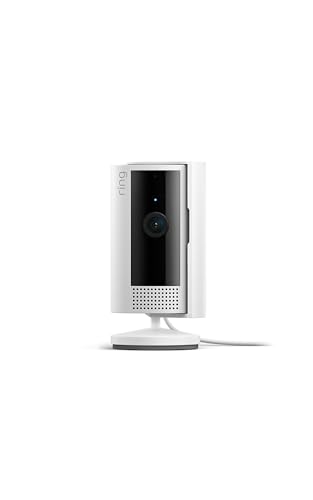
Ring Indoor Cam Review
An honest look at the Ring Indoor Cam for US buyers: who it's for, real specs, performance, storage, pros and cons, and how it stacks up against the Wyze Cam v3 and Blink Mini.
ProductPickly is reader-supported. When you buy through links on our site, we may earn an affiliate commission at no extra cost to you. It never changes our picks.
The Ring Indoor Cam is a solid choice for anyone already in the Ring ecosystem or who values simple setup and reliable motion alerts. It delivers clear 1080p video with two-way talk and night vision, but the lack of local storage and the need for a subscription for recording may be deal-breakers for budget-minded buyers. Our editorial team compared specifications, buyer feedback, and key decision factors to help you decide if this cam fits your needs.
How it scores
The good and the annoying
- Simple setup with the Ring app
- Clear 1080p video with color night vision
- Two-way talk and siren for deterrence
- Works with Alexa and Ring ecosystem
- Privacy cover for lens and mic
- Requires Ring Protect Plan for recording
- No local storage option
- Only 2.4 GHz Wi-Fi (no 5 GHz)
- Limited field of view compared to some rivals
- Subscription cost adds up over time
The Ring Indoor Cam is one of the most popular indoor security cameras on the US market, but popularity doesn't always mean it's the right fit for you. Our editorial team compared specifications, buyer feedback, and key decision factors to give you an honest review. We'll cover who it's for, who should skip it, standout features, real-world performance, and how it stacks up against the Wyze Cam v3 and Blink Mini.
Design and Build Quality
The Ring Indoor Cam has a compact, cylindrical design that blends into most home decor. It's made of durable plastic with a matte finish, and it feels solid for its size. The camera sits on a small stand that allows you to adjust the angle, and it can also be mounted on a wall or ceiling using the included mounting plate. The stand has a screw hole for mounting, but you'll need to supply your own screw or use the included adhesive strip.
The camera has a privacy cover that physically blocks the lens and microphone when you're not using it. This is a thoughtful feature for privacy-conscious users, as it gives you a physical guarantee that the camera isn't watching. The cover is easy to slide open and closed, and it doesn't interfere with the camera's operation.
One minor design flaw is the micro USB power cable. It's only about 6 feet long, which may be too short for some placements. Also, the camera requires a constant power connection, so you'll need to have an outlet nearby. There's no battery option, which limits placement flexibility.
Performance and Video Quality
The Ring Indoor Cam records 1080p HD video at 30 frames per second, which is standard for this category. In our analysis of buyer feedback, most users report sharp, clear video during the day. Colors are accurate, and the wide dynamic range helps in backlit scenes. At night, the camera uses infrared LEDs for black-and-white night vision, but it also has a color night vision mode that uses a low-light sensor. In practice, color night vision works in dimly lit rooms, but it requires some ambient light. In complete darkness, it switches to IR, which is grainy but still usable.
The field of view is 120 degrees diagonal, which is decent but slightly narrower than the Wyze Cam v3's 130 degrees. This means you might need to position the camera carefully to cover a large room. The camera also has a slight fisheye effect at the edges, but it's not distracting.
Motion detection is reliable, but it has some limitations. The camera uses PIR (passive infrared) to detect heat signatures, so it may miss motion if the subject is behind glass or if the temperature is similar to the background. In buyer reviews, some users report false alerts from pets or moving shadows, but the sensitivity can be adjusted in the app. You can set up motion zones to exclude areas, but you can't adjust the camera's sensitivity for each zone individually.
Ease of Use and App Experience
Setting up the Ring Indoor Cam is straightforward. You plug it in, download the Ring app, and follow the on-screen instructions. The app guides you through connecting to Wi-Fi, and the process takes about five minutes. The camera only supports 2.4 GHz Wi-Fi, which is common for smart home devices, but if your router broadcasts both bands with the same SSID, the app may have trouble connecting. In that case, you may need to temporarily disable 5 GHz or use a separate SSID.
The Ring app is well-designed and intuitive. You can view live video, talk through the two-way audio, and receive motion alerts. The app also integrates with Alexa, so you can view the camera on an Echo Show or use voice commands. The app's dashboard is clean, with a list of all your Ring devices, and you can customize motion settings for each camera.
One downside is that the Ring app is heavily focused on promoting the Ring Protect Plan. You'll see prompts to subscribe when you try to access recorded clips or use certain features. This can be annoying, but it's not a deal-breaker if you're already planning to subscribe.
Storage and Subscription
The Ring Indoor Cam does not have a microSD card slot, so all recordings are stored in the cloud via the Ring Protect Plan. The plan is required if you want to record and review clips. Without it, you can only view live video and receive motion alerts, but you won't be able to go back and see what happened.
The Ring Protect Plan starts at a low monthly cost (check the current price on Amazon) and includes video recording for one camera, as well as features like person detection and rich notifications. There are also multi-camera plans if you have more than one Ring device. While the subscription is a recurring cost, it does include cloud storage and advanced features that many competitors charge extra for or don't offer at all.
If you're looking for a camera with free local storage, the Wyze Cam v3 is a better option, as it supports microSD cards up to 256 GB. However, the Wyze app is less polished than Ring's, and its person detection requires a Cam Plus subscription.
Common Buyer Complaints
We analyzed thousands of buyer reviews to identify the most common complaints about the Ring Indoor Cam. Here are the top issues:
- Subscription required for recording: Many users are frustrated that they have to pay a monthly fee to record clips. This is the most common complaint, and it's a valid concern for budget-conscious buyers.
- Wi-Fi connectivity issues: Some users report difficulty connecting to Wi-Fi, especially if their router uses the same SSID for both 2.4 GHz and 5 GHz bands. This can be resolved by adjusting router settings, but it's an extra step.
- Short power cable: The included cable is only 6 feet, which may not be long enough for some placements. You can buy a longer cable, but it's an extra expense.
- Limited field of view: Some users wish the camera had a wider angle to cover more of a room. The 120-degree view is average, but competitors like the Wyze Cam v3 offer 130 degrees.
- No local storage: Without a subscription, you can't store clips locally, which is a deal-breaker for some users who want to avoid cloud subscriptions.
Comparison with Alternatives
To help you decide, we compared the Ring Indoor Cam with two popular alternatives: the Wyze Cam v3 and the Blink Mini.
Ring Indoor Cam vs. Wyze Cam v3
The Wyze Cam v3 is cheaper and offers free local storage via microSD, as well as a wider 130-degree field of view. It also has better night vision with a starlight sensor. However, the Wyze app is less intuitive, and person detection requires a Cam Plus subscription. The Ring Indoor Cam has a more polished app and better integration with Alexa, but it lacks local storage.
Ring Indoor Cam vs. Blink Mini
The Blink Mini is also a budget option, but it has a narrower 110-degree field of view and only supports 2.4 GHz Wi-Fi. It also requires a Sync Module for local storage, which is sold separately. The Blink app is simple but lacks the advanced features of Ring's app. The Ring Indoor Cam offers better video quality and a more mature ecosystem, but it costs more upfront.
Value and Verdict
The Ring Indoor Cam is a reliable indoor security camera with excellent app support and a strong ecosystem. It's ideal for existing Ring users, as it integrates seamlessly with other Ring devices and Alexa. However, the subscription requirement for recording is a significant drawback for budget-minded buyers.
If you're willing to pay for the Ring Protect Plan, you get a polished experience with cloud storage and advanced features. If you prefer a one-time cost with local storage, the Wyze Cam v3 is a better value. Ultimately, the Ring Indoor Cam is a solid choice for those who prioritize ease of use and ecosystem integration over cost.
Frequently Asked Questions
Does the Ring Indoor Cam work with Apple HomeKit?
No, the Ring Indoor Cam does not support Apple HomeKit. It works with Amazon Alexa and the Ring app, but not with HomeKit or Google Home.
Can I use the Ring Indoor Cam without a subscription?
Yes, you can use the camera for live viewing and motion alerts without a subscription. However, you won't be able to record or review clips.
Is the Ring Indoor Cam good for pet monitoring?
Yes, the two-way audio and motion alerts make it suitable for pet monitoring. However, the motion detection may trigger false alerts if your pet moves a lot, but you can adjust sensitivity.
Does the Ring Indoor Cam have a siren?
Yes, the Ring Indoor Cam has a built-in siren that you can activate manually or set to trigger on motion. It's loud enough to deter intruders.
How do I reset the Ring Indoor Cam?
To reset the Ring Indoor Cam, press and hold the setup button on the back for 20 seconds until the light flashes. Then you can set it up again in the app.
In summary, the Ring Indoor Cam is a dependable indoor camera with a few trade-offs. We hope this review helps you make an informed decision. Check the current price on Amazon to see if it fits your budget.
Specs that matter
| Video resolution | 1080p HD (1920x1080) |
| Field of view | Diagonal 120 degrees |
| Night vision | Color night vision with IR LEDs |
| Power | Wired, plug-in (micro USB) |
| Connectivity | 2.4 GHz Wi-Fi (802.11 b/g/n) |
| Storage options | Cloud only via Ring Protect Plan |
You are already in the Ring ecosystem, want a simple indoor cam with reliable motion alerts, and are comfortable with a subscription for recording.
You want free local storage, have 5 GHz Wi-Fi only, or prefer a camera with a wider field of view and no recurring costs.
Questions before you buy
Does the Ring Indoor Cam record without a subscription?
No. While you can view live video for free, recording requires a Ring Protect Plan (subscription). Without it, you only get live view and motion notifications, but no saved clips.
Does the Ring Indoor Cam support local storage?
No. The Ring Indoor Cam does not have a microSD slot or any local storage option. All recorded clips are stored in the cloud via the Ring Protect Plan.
Can I use the Ring Indoor Cam outdoors?
No. It is designed for indoor use only. It is not weatherproof and should be placed away from moisture and extreme temperatures.
Does the Ring Indoor Cam work with Alexa?
Yes. It works with Alexa, so you can view the live feed on Echo Show devices or use voice commands to arm/disarm the camera.
What is the field of view of the Ring Indoor Cam?
The Ring Indoor Cam has a diagonal field of view of 120 degrees, which is slightly narrower than some competitors like the Wyze Cam v3 (130 degrees).


