Memory Cards and Storage
Best SD Card Readers for Fast Transfers in 2026
7 picks compared
6 min read
ProductPickly is reader-supported. When you buy through links on our site, we may earn an affiliate commission at no extra cost to you. It never changes our picks.
The short answerThe Anker USB 3.0 SD Card Reader leads for reliability, while the ProGrade Digital CFexpress Type B Reader excels for professionals, and the UGREEN USB C Reader offers the best value. We compared transfer speeds, build quality, and compatibility.
?How we pickedWe compare published specifications, safety certifications and thousands of verified owner reviews, and we do not physically test every unit. Read the full process in our review methodology.
Anker USB 3.0 SD Card Reader
★★★★★ 4.7 / 5 Best Overall
This reader supports SD, SDHC, and SDXC cards up to 2TB. It delivers read speeds up to 5Gbps via USB 3.0. The compact aluminum body resists drops and heat.
Interface USB 3.0Card Support SD, SDHC, SDXCMax Speed 5 GbpsCable Built-in
- Fast transfer speeds
- Durable aluminum build
- Works with most SD cards
- No microSD slot
- USB-A only
ProGrade Digital CFexpress Type B Card Reader
★★★★★ 4.8 / 5 Best for Professionals
This reader is built for CFexpress Type B cards, offering transfer speeds up to 10Gbps. It features a USB-C 3.2 Gen 2 interface and a rugged metal housing. Photographers use it for large RAW files and 4K video.
Interface USB-C 3.2 Gen 2Card Support CFexpress Type BMax Speed 10 GbpsMaterial Aluminum
- Extremely fast transfers
- Durable construction
- Ideal for high-end cameras
- Expensive
- Only CFexpress, no SD
Best for: Best for Professionals
UGREEN USB C SD Card Reader
★★★★★ 4.6 / 5 Best Value
The UGREEN reader supports SD and microSD cards simultaneously. It uses USB-C 3.0 for speeds up to 5Gbps. Its compact design fits easily in a pocket.
Interface USB-C 3.0Card Support SD, microSDMax Speed 5 GbpsSize Pocket-sized
- Affordable
- Dual card slots
- Works with USB-C devices
- Plastic body
- No USB-A connector
SanDisk MobileMate USB 3.0 microSD Card Reader
★★★★★ 4.7 / 5 Best for MicroSD
This reader is designed exclusively for microSD cards. It supports microSD, microSDHC, and microSDXC up to 1TB. The USB 3.0 interface ensures fast transfers.
Interface USB 3.0Card Support microSD, microSDHC, microSDXCMax Capacity 1TBCable Built-in
- Compact and portable
- Reliable for microSD
- Plug-and-play
- No standard SD slot
- USB-A only
Best for: Best for MicroSD
Apple USB-C to SD Card Reader
★★★★★ 4.6 / 5 Best for MacBook Users
This reader is designed for MacBooks and iPads with USB-C. It supports SD, SDHC, and SDXC cards. The white plastic body matches Apple's aesthetic.
Interface USB-CCard Support SD, SDHC, SDXCCompatibility Mac, iPadCable No cable, direct plug
- Plug-and-play with Mac
- Compact design
- Reliable performance
- Limited to USB-C
- No microSD slot
Best for: Best for MacBook Users
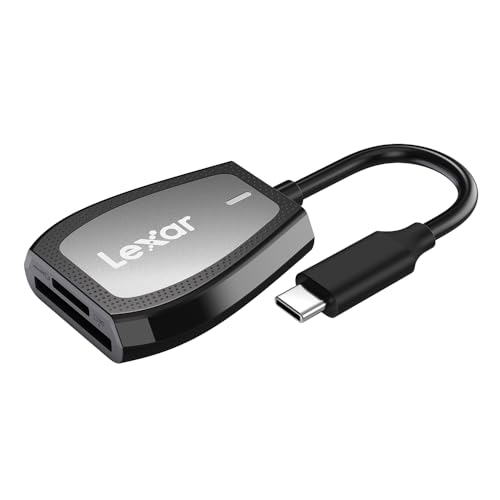
Lexar Professional USB-C Dual-Slot Reader
★★★★★ 4.5 / 5 Best for Dual Card Slots
The Lexar reader accepts both SD and CFexpress Type B cards. It uses USB-C 3.2 Gen 1 for speeds up to 5Gbps. The foldable design protects the connector.
Interface USB-C 3.2 Gen 1Card Support SD, CFexpress Type BMax Speed 5 GbpsDesign Foldable
- Two card formats
- Foldable design
- Good transfer speeds
- Bulky compared to single-slot
- No USB-A
Best for: Best for Dual Card Slots
Kingston MobileLite Plus SD Reader
★★★★★ 4.4 / 5 Best for Travel
This reader features a keyring loop and a compact body. It supports SD, SDHC, and SDXC cards. The USB 3.0 interface provides decent speeds.
Interface USB 3.0Card Support SD, SDHC, SDXCDesign Keyring loopCable No cable, direct plug
- Very portable
- Durable build
- Easy to attach to keys
- Slower than USB-C options
- No microSD slot
Best for: Best for Travel
Our picks cover USB-C, USB-A, microSD, and CFexpress. We prioritized real-world transfer speeds and build quality over flashy features.
What to Look For in an SD Card Reader
Speed matters most. A USB 3.0 reader transfers at up to 5Gbps, while USB 2.0 caps at 480Mbps. Check card compatibility: SD, microSD, or CFexpress. Build quality affects durability. Metal bodies last longer than plastic. Consider the connector type: USB-C is modern, USB-A is universal.
USB-C vs USB-A: Which Is Better?
USB-C is faster and reversible. It works with modern laptops and phones. USB-A is more common on older devices. Many readers offer both connectors. If you use a MacBook, USB-C is essential. For desktop PCs, USB-A is convenient. Choose based on your primary devices.
SD Card Speed Classes Explained
Speed classes indicate minimum write speeds. Class 10 is 10MB/s, UHS-I is up to 104MB/s, UHS-II up to 312MB/s. A fast reader is wasted on a slow card. Match the reader to your card's speed class. For 4K video, UHS-II is recommended. Check your camera's requirements.
How to Choose for Your Use Case
Photographers need fast CFexpress readers. Travelers prefer compact, keychain models. Mac users should get USB-C readers. For general use, a dual-slot reader is versatile. Consider whether you need to read microSD cards. Budget readers are fine for occasional transfers. Professional work demands speed and durability.
Questions people ask
What is the fastest SD card reader?
The ProGrade Digital CFexpress Type B Reader offers up to 10Gbps. For SD cards, USB 3.0 readers like the Anker reach 5Gbps. Actual speed depends on the card's rating.
Can I use an SD card reader with my iPhone?
Yes, but you need a Lightning or USB-C reader. Apple sells a USB-C to SD Card Reader. Third-party options work with iOS apps.
Is a USB-C SD card reader worth it?
If your devices have USB-C, yes. It offers faster speeds and a reversible connector. It's future-proof.
What is the difference between UHS-I and UHS-II?
UHS-II is faster, up to 312MB/s, while UHS-I is up to 104MB/s. UHS-II cards have an extra row of pins. Readers must support UHS-II to use its speed.
Can I read microSD cards with a standard SD reader?
Often yes, with an adapter. Many readers include a microSD slot. If not, use a microSD to SD adapter.
How do I know if my SD card is compatible with a reader?
Check the reader's supported card types. Most support SD, SDHC, and SDXC. Some only support microSD. Look for the logo on the reader.
Is it safe to leave an SD card in a reader?
It's generally safe, but avoid extreme heat or moisture. Remove the card properly to prevent data corruption.
What should I do if my computer doesn't recognize the reader?
Try a different USB port. Update your drivers. Check if the card is locked. If using a hub, connect directly to the computer.
The bottom lineSo which one?
For most people, the Anker USB 3.0 SD Card Reader offers the best balance of speed and reliability. Professionals should invest in the ProGrade CFexpress reader. Budget buyers will appreciate the UGREEN USB C reader.